
Fulfill a preparation request in the kitchen
Accept the branch request, record actual production, and track dispatch and receipt when the kitchen is at another branch.
Steps
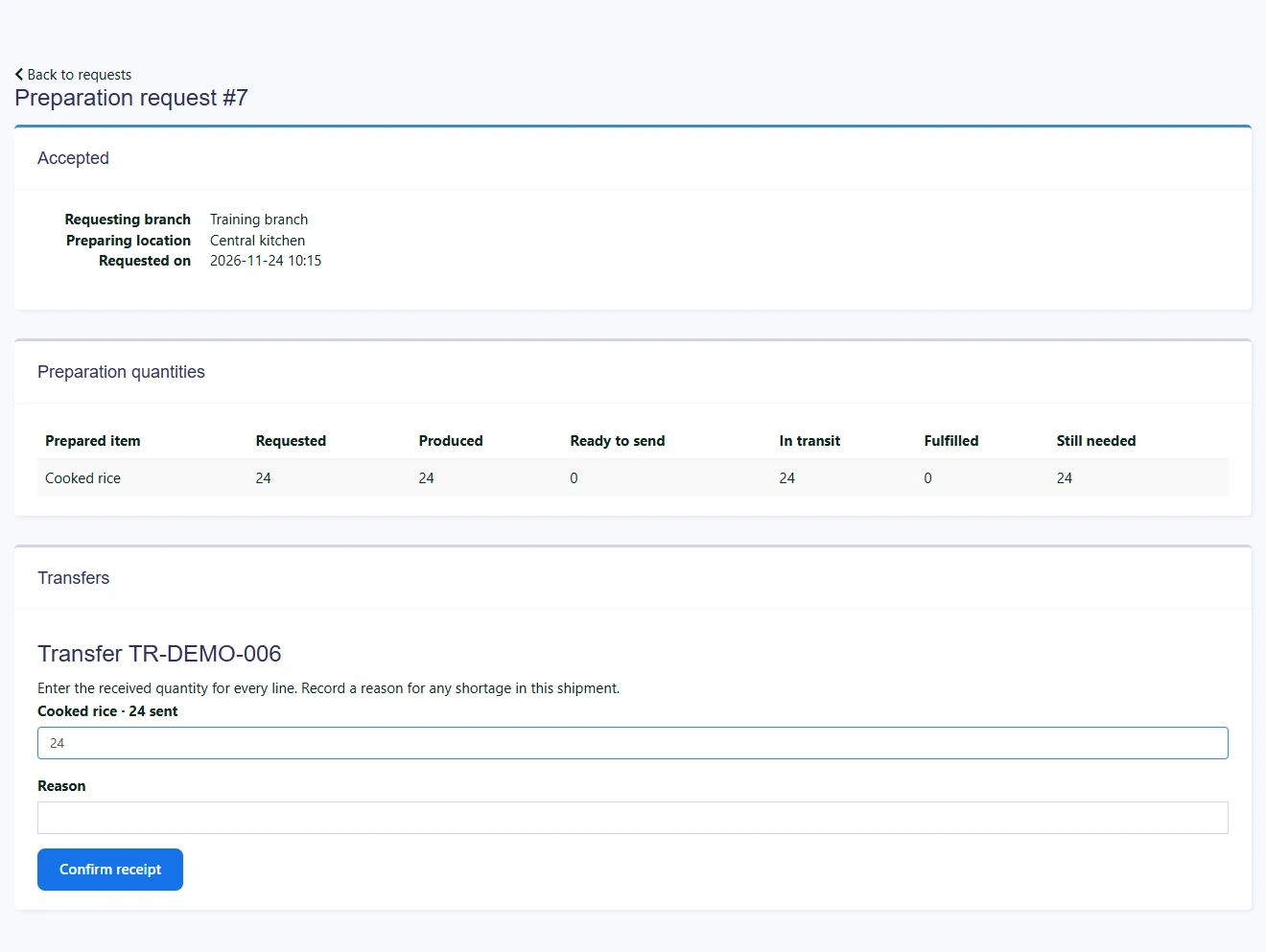
-
Accept the request
Open the preparation request and check branch, items and quantities. Click Accept if the kitchen can make it.
-
Create a production order
From the request click Create approved production order and record actual output and ingredients used.
-
Record what left
For another branch enter the quantity and dispatch. If sent in stages, record each shipment.
-
The branch confirms receipt
The requesting branch enters what actually arrived and clicks Confirm receipt. Any difference is reviewed.
Fields and buttons
| Field or button | When to use it | Result and how to check |
|---|---|---|
| Accept request | Preparation location checks items, need and timing before accepting. | The requesting branch can follow the same request. |
| Create approved production order | Use the available linked action to keep output connected to the request. | Compare actual output to demand before dispatching. |
| Quantity to dispatch | At the central kitchen record actual dispatch and unit on the source lot. | Track in-transit stock from the request and transfer. |
| Quantity physically received | Receiving branch checks count and confirms against the source reference. | Destination stock follows recorded receipt and discrepancies remain traceable. |
Worked example
Two-stage fulfillment
Training example. The branch requests 30 portions and the kitchen can prepare 20 now. Record the 20 actual portions and track their dispatch and receipt. Keep the remaining 10 visible for the next batch.
From ChatGPT or Claude
Once KEMET is connected to your assistant, copy and send this request:
Show preparation requests sent to the kitchen and accept this one.
The assistant reads data right away. Any change is shown to you in KEMET for approval before it runs, within your account permissions only.
Tools the assistant uses here
restaurant_list_preparation_requestsrestaurant_propose_accept_preparation_requestrestaurant_propose_queue_preparation_production
Verify the result
- Output links to the request and the status explains fulfilled quantities.
- Cross-branch receipts reconcile to the transfer and destination stock.
Common problems
Accept or Dispatch is missing
Check request status, preparation location, and your permissions. The action is available to the location responsible for the current step.
Received quantity is below dispatch
Record what actually arrived and open the transfer to review outstanding quantity or discrepancy before any reversal or adjustment.
For: Kitchen team Branch manager
Screens and buttons depend on your account permissions and branches. Images show KEMET with training data.