
Verify discounts across POS and online
Compare item display, cart price and total for the same branch and item. Check coupon eligibility when the price differs.
Steps
-
Review the offer
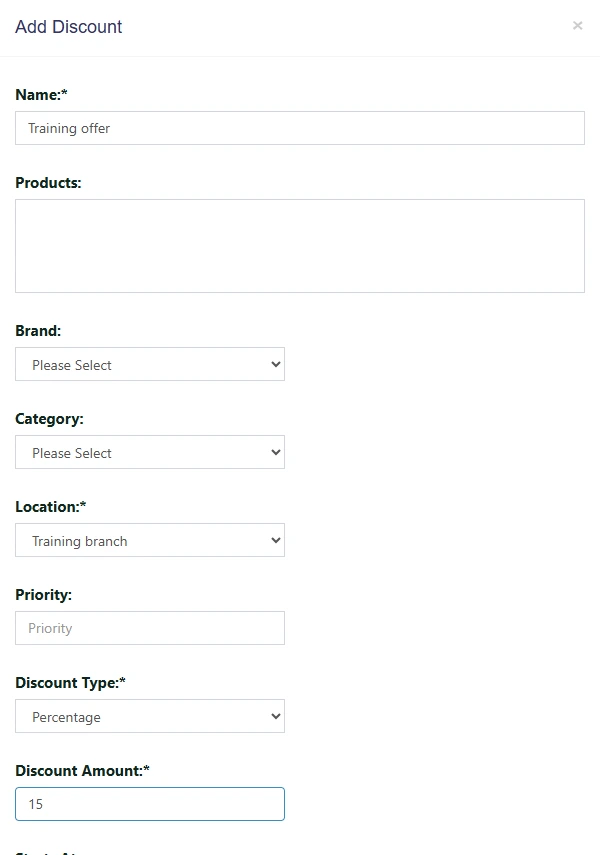
Open the discount in Discount management and check dates, branch and items.
-
Compare menu prices
Open the same item in the online menu and compare with the same size and add-ons.
-
Try the coupon
Apply the coupon in the cart. You see the automatic discount first, then the coupon.
-
Check the total
If the price changes, confirm again. The confirmed total must equal the order the cashier receives.
Fields and buttons
| Field or button | When to use it | Result and how to check |
|---|---|---|
| Promotion name and dates | Use a recognizable label and effective dates, then test the intended order time. | Test the same cart inside and outside the promotion window. |
| Branch and product scope | Choose eligible locations and items or categories using available fields. | Test one eligible item and one outside the promotion. |
| Discount type and value | Check fixed or percentage mode and its amount. | A KWD 5.000 item with 10% off is KWD 4.500 before charges or tax. |
| Coupon and minimum | Apply the coupon to the adjusted cart and verify its eligibility and threshold. | For rejection, compare eligible amount with minimum, dates and order type. |
| Price reconfirmation | If repriced, inspect menu, modifiers and fees before confirming again. | Match the confirmed total to the branch's incoming order. |
Worked example
Ten percent off
Training example. A KWD 5.000 item with 10% off is KWD 4.500 before fees and tax. An eligible coupon uses the displayed eligible cart base after the automatic discount.
From ChatGPT or Claude
Once KEMET is connected to your assistant, copy and send this request:
Show active discounts in my branch and the items they apply to.
The assistant reads data right away. Any change is shown to you in KEMET for approval before it runs, within your account permissions only.
Tools the assistant uses here
restaurant_list_active_discount_rulesrestaurant_list_discount_item_assignmentsrestaurant_native_discount_discount_summary
Verify the result
- Item details, cart and confirmed total apply the same eligible offer for the branch.
- Any difference is explained by a visible item such as an add-on, fee or tax.
Common problems
The discount appears only in POS
Compare category, price and menu for the same branch. Use its storefront link and refresh the cart.
The coupon was rejected after an item discount
Check the minimum against the eligible discounted cart, plus dates, items and fulfillment type.
For: Restaurant owner Branch manager Cashier
Screens and buttons depend on your account permissions and branches. Images show KEMET with training data.