
Print KOT and trace station routing
Test the kitchen order ticket and the customer bill on their own routes, and trace any printing failure from the existing order.
Steps
-
Check the kitchen printer
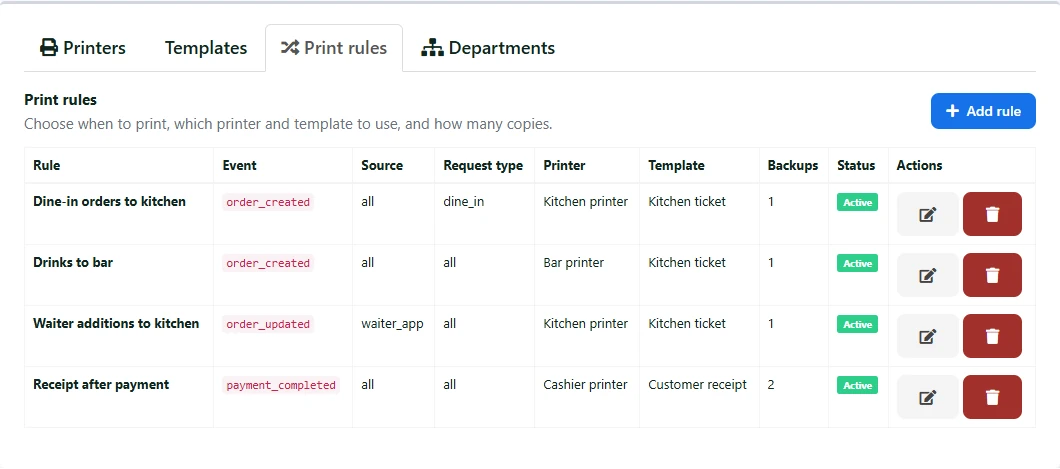
In Print settings → Print rules, make sure a KOT rule exists for the kitchen. The cashier printer alone is not enough.
-
Print a test
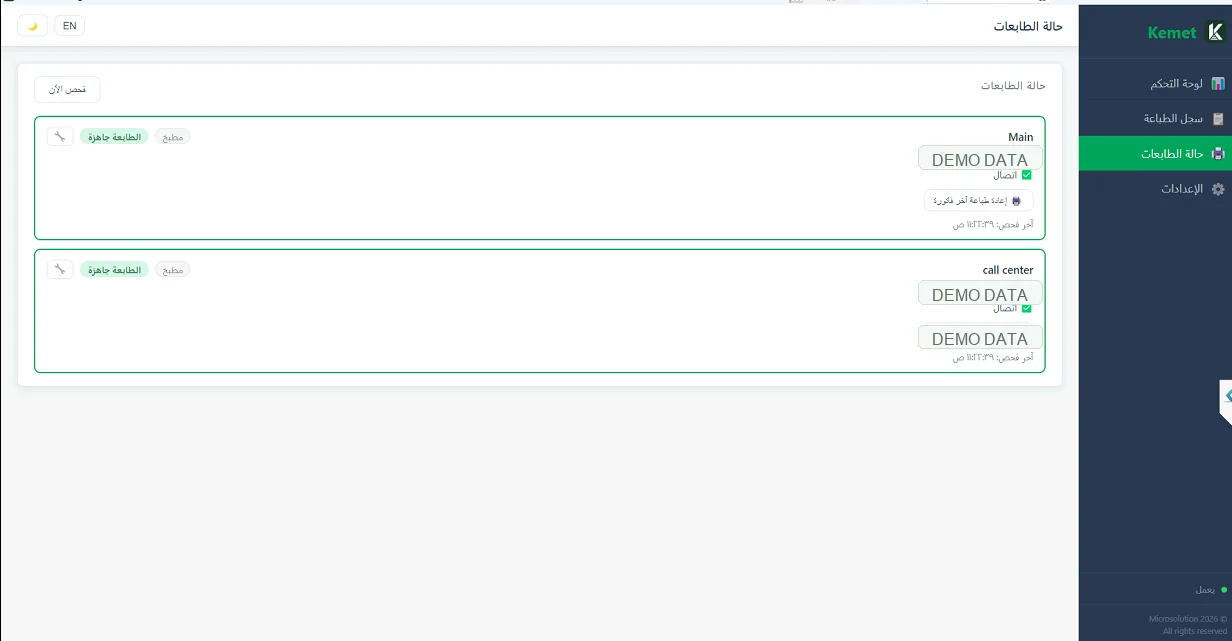
In Printers click Test. If you use the Print Agent, make sure it is connected.
حالة الطابعات في برنامج الطباعةView full size -
Send an order to the kitchen
Send an item with a note from POS or the waiter app. The ticket must show station, table and quantity.
-
Reprint if needed
From the same order choose Reprint KOT. The customer bill prints from Print bill.
Fields and buttons
| Field or button | When to use it | Result and how to check |
|---|---|---|
| KOT | Use KOT for kitchen preparation from the existing order. Use Invoice for the guest receipt. | Match order reference, table or fulfillment type and kitchen lines. |
| Order dispatch or update | Check the print rule triggered by dispatch or later additions. | Test one event and confirm job creation, ticket type and copy count. |
| Item station | Match the item's category or department to the branch kitchen printer. | A bar item can print at its own station according to routing. |
| Queue and connection | If KDS updated but printing did not, check the print job before troubleshooting hardware. | No job points to routing. A failed job points to the agent, connection or printer. |
| Reprint | Use the existing reference after checking whether the first copy printed. | Verify quantities and reference and that the copy belongs to the original order. |
Worked example
Separate grill ticket
Training example. A dine-in order includes a drink and a grill dish. Confirm the grill ticket reaches its configured station and the guest bill covers the full order.
From ChatGPT or Claude
Once KEMET is connected to your assistant, copy and send this request:
Show kitchen ticket print rules and reprint this order's ticket.
The assistant reads data right away. Any change is shown to you in KEMET for approval before it runs, within your account permissions only.
Tools the assistant uses here
restaurant_list_print_routing_rulesrestaurant_get_print_job_timelinerestaurant_propose_reprint_kitchen_ticket
Verify the result
- The KOT shows the reference, items and notes needed by the kitchen.
- Reprint produced the requested copy from the existing order.
Common problems
The order is visible in KDS and no ticket came out
Check whether a print job was created and a KOT rule applied. If a job failed, examine printer connectivity and the agent or tablet route.
The order printed only at the cashier
Check ticket type and printer assignment per station. Test one item for that station and verify whether the result is a receipt or KOT.
For: Kitchen team Waiter Branch manager Cashier
Screens and buttons depend on your account permissions and branches. Images show KEMET with training data.