
Configure account mappings and review inventory costs
Review the accounts used in automatic posting and verify materials, preparation, waste and payments from source documents.
Steps
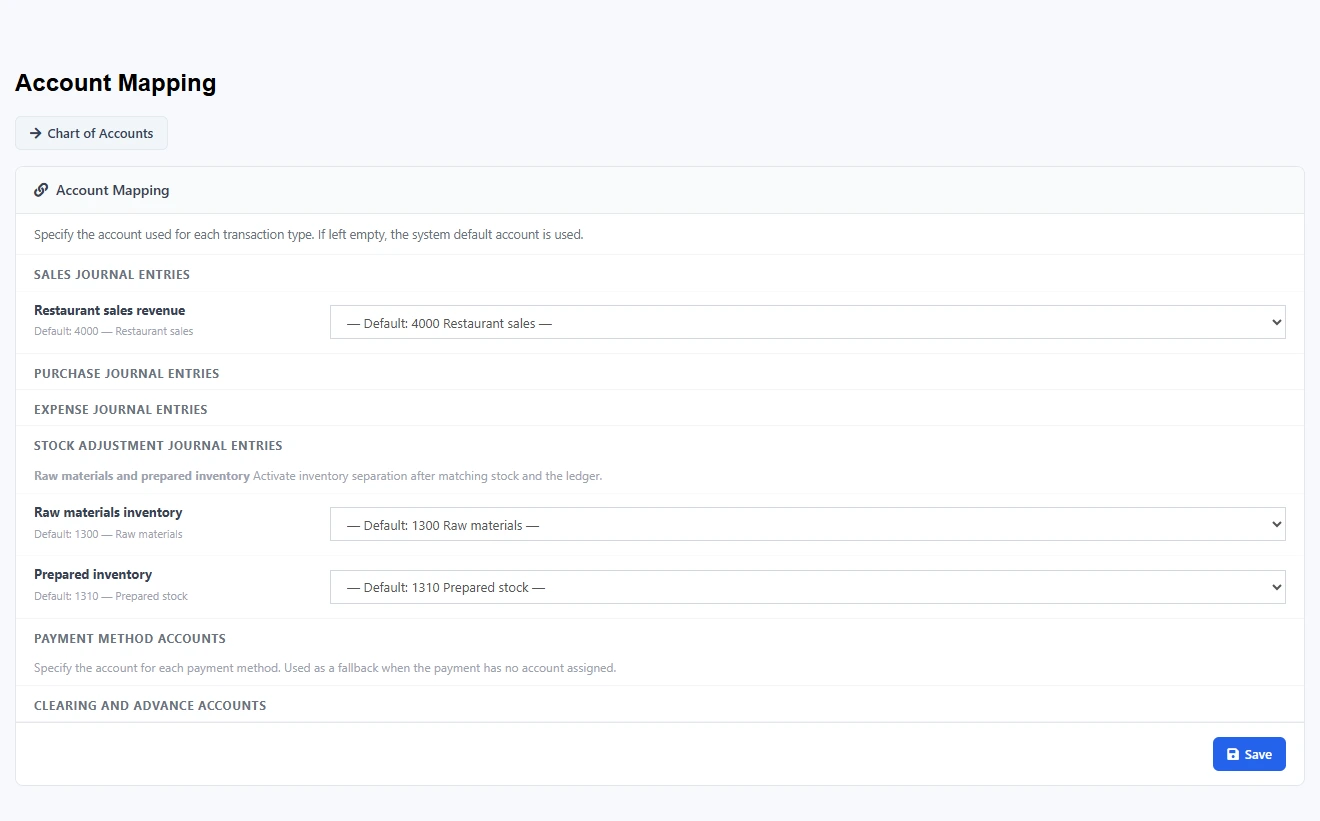
-
Open account mappings
Go to Accounting → Account mappings. Each operation (sale, stock, collection, return) shows the account its entry posts to.
-
Separate raw and prepared stock if needed
If you track raw materials and prepared food separately, choose an account for each. For an existing company, reconcile balances with your accountant first.
-
Try one operation of each kind
In a training branch, record a receipt, a production, a sale and a return. Open each entry from its document and check the accounts.
-
Fix any blocked entry
If an account is reported missing, fix the mapping on the same screen. Then repost the document if the button is available to you.
Fields and buttons
| Field or button | When to use it | Result and how to check |
|---|---|---|
| Sale and collection | Check sales, cost and inventory, then tender and receivables mapping as configured. | Match sales and payment journal references to the invoice and branch. |
| Stock preparation | Check mapped raw and prepared stock accounts for this company. | The production journal shows issued cost and received output after completion. |
| Purchase and stock transfer | Verify inventory, supplier and in-transit accounts and branch scope by document. | The entry links to purchase or transfer, with actual receipt value on the source. |
| Return and waste | Check the credit note, stock or cost accounts and any separate refund tender. | Open Return journals and reconcile note value, cost and refund references. |
| Bank reconciliation | Check gateway fee, clearing and bank accounts before reconciling. | Bank net ties to receipts after refunds and fees. |
Worked example
Manufacturing output from raw stock
Training example. KWD 20.8416 of issued raw materials debits prepared inventory and credits raw inventory at completion when split accounts are configured. Match quantities and lot values in the order and journal.
From ChatGPT or Claude
Once KEMET is connected to your assistant, copy and send this request:
Show my company's accounting mappings for sales and inventory and tell me if any is missing.
The assistant reads data right away. Any change is shown to you in KEMET for approval before it runs, within your account permissions only.
Tools the assistant uses here
restaurant_list_company_accounting_mappingsrestaurant_list_company_ledger_accountsrestaurant_report_inventory_posting_controls
Verify the result
- Tested accounts belong to the company and each branch movement is traceable.
- Raw and prepared balances reconcile to their stock documents after posting.
Common problems
A mapped account is missing
Check whether the mapped number references another company or an inactive account. Verify the approved company account before retrying.
Historical lots block split inventory mapping
Review open lots, related movements and posted journals with accounting, then determine how to reconcile the carryover balances.
For: Accountant Restaurant owner Branch manager
Screens and buttons depend on your account permissions and branches. Images show KEMET with training data.