
Review the chart of accounts and posting accounts
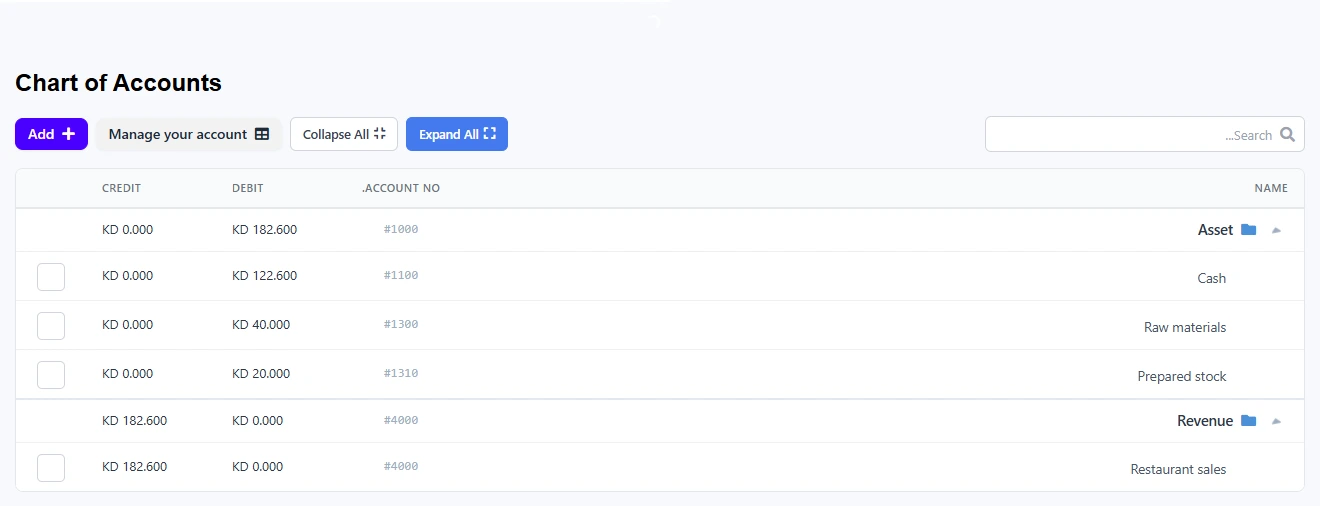
Identify each account by code, name and category. Verify mappings before posting new activity or changing an existing setup.
Steps
-
Open the chart of accounts
Go to Payment accounts → Chart of accounts. Accounts are grouped into assets, liabilities, revenue and expenses.
-
Search by number or name
Find the account by its number. Where names look alike, use the number.
-
Know the posting account
Accounts that accept entries appear in manual journals. A heading only totals the accounts below it.
-
Check operation mappings
Open account mappings to see which account purchases, production and waste post to.
-
Change only with your accountant
If the account has past movements, review its balances before changing a mapping, and record the change and date.
Fields and buttons
| Field or button | When to use it | Result and how to check |
|---|---|---|
| Account code and name | Search by code and inspect the localized name | Distinguish similar names such as raw ingredients and prepared stock. |
| Account classification | Verify group and classification with accounting | The ledger and financial statements follow the classification. |
| Parent and posting account | Inspect hierarchy and the account used for postings | Stock and sales documents use the operational mapping of the posting account. |
| Operational mapping and branch | Review raw stock, prepared stock and waste mappings where configured | A new batch journal shows the mapped source raw account and the destination prepared account. |
| Test a new mapping | Post a permitted new test movement and inspect the ledger | Match test documentation and journal by reference. Existing posted entries require documented correction. |
Worked example
Separate raw and prepared inventory
In this example, the company tracks raw materials and prepared output in separate asset accounts. A supported batch journal moves cost between the mapped accounts.
From ChatGPT or Claude
Once KEMET is connected to your assistant, copy and send this request:
Show my chart of accounts and account types.
The assistant reads data right away. Any change is shown to you in KEMET for approval before it runs, within your account permissions only.
Tools the assistant uses here
restaurant_list_company_ledger_accountsrestaurant_list_company_account_types
Verify the result
- Every account has an identifiable code, category and purpose.
- Sample purchases, production and payments use the mapped accounts.
Common problems
An account cannot be selected in a new entry
Check whether it is a heading, closed or unavailable for posting in this company.
Chart balance differs from a period report
Check whether a cumulative balance is being compared with period movement. Verify filters and any legacy movement before correcting anything.
For: Restaurant owner Accountant Branch manager
Screens and buttons depend on your account permissions and branches. Images show KEMET with training data.