
Use the trial balance, general ledger, income statement and balance sheet
Choose the report that answers the question and trace amounts to entries and documents using matching dates and scope.
Steps
-
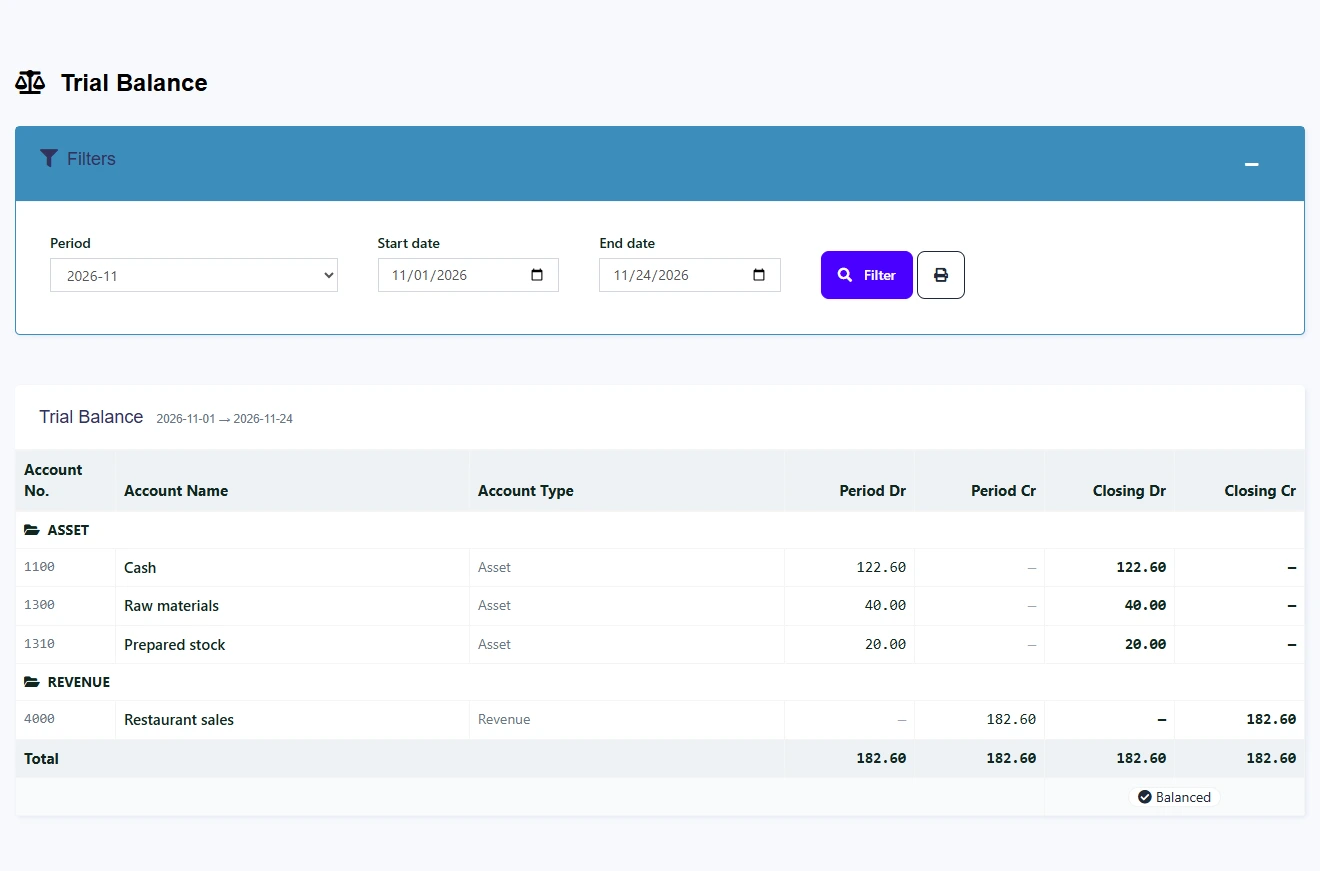
Start with the trial balance
Open Report Center → Trial balance and choose the period. You see debit and credit totals for every account.
-
Follow one account in the ledger
Pick the account in the General ledger for the same period. Each line leads to the document behind the figure.
-
See profit in the income statement
Open the Income statement for the same period. You see revenue, expenses and the net result.
-
Open the balance sheet for a date
Choose the date and branch in the Balance sheet. You see assets, liabilities and equity on that day.
-
If figures differ, find the cause
Make sure every report uses the same period. If a difference remains, look for a draft or late document before correcting anything.
Fields and buttons
| Field or button | When to use it | Result and how to check |
|---|---|---|
| Trial balance | Use for account balances and movements in the selected period. | Open the related ledger to distinguish opening balance from activity. |
| General ledger | Choose account and dates, and branch where offered. | Match individual entries to source documents and account values. |
| Income statement | Use for mapped revenue, costs and expenses in the period. | Trace figures to posted entries and reconcile cash collections separately. |
| Period and branch scope | Match date range and scope across comparisons and check journal filters. | Branch figures can represent branch lines in a multi-branch entry. Check the detail. |
Worked example
Tracing an unexpected maintenance expense
The income statement shows KWD 140.000 for the month. Open the maintenance account in General Ledger for the same month. If KWD 25.000 came from a reclassification, inspect its memo and both accounts.
From ChatGPT or Claude
Once KEMET is connected to your assistant, copy and send this request:
Show this month's trial balance for my branch and compare it with profit and loss.
The assistant reads data right away. Any change is shown to you in KEMET for approval before it runs, within your account permissions only.
Tools the assistant uses here
restaurant_report_branch_trial_balancerestaurant_native_reports_financial_profit_lossrestaurant_list_branch_journal
Verify the result
- Trial balance, ledger and income statement use the same period.
- Compared figures have source references and the balance sheet scope is clear.
Common problems
The ledger is empty
Select an account and period, then check entry status.
POS sales differ from income statement revenue
Align dates and branches, then check returns, discounts and transaction versus posting dates. Compare against the appropriate revenue account.
For: Restaurant owner Accountant Branch manager
Screens and buttons depend on your account permissions and branches. Images show KEMET with training data.