
Collect payment against one or more invoices
Find outstanding invoices and record a payment once with a clear allocation to invoices or customer advance as configured.
Steps
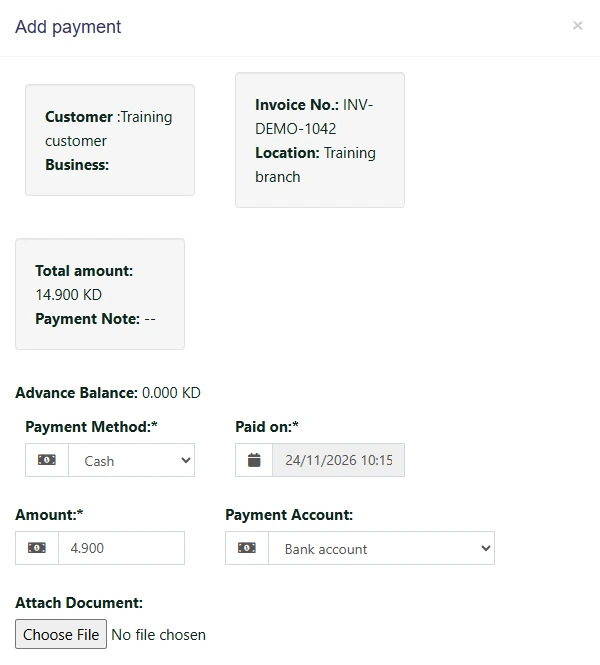
-
Find the amount due
Open the invoice or customer account. You see what is left after deposits, returns or earlier payments.
-
Record the actual payment
Choose the invoice (or several for the same customer) and the method actually used, and enter the receipt reference.
-
Check the allocation
Allocations must add up to the amount paid. Any extra stays as customer credit; review it before saving.
-
Confirm the invoice updated
Return to the invoice and see the lower balance. Open the collection entry and check branch, method and amount.
Fields and buttons
| Field or button | When to use it | Result and how to check |
|---|---|---|
| Branch and collection point | Verify collection location and permission | Cash follows the mapped collection point and receipt. |
| Customer and invoices | Open the same customer’s invoices and confirm references | The due balance reflects prior discounts and settlements. |
| Tender and reference | Enter the actual amount and record the terminal reference when available | Reconcile the receipt to the actual tender movement. |
| Allocated and remaining amount | Allocate up to the actual balance and review any excess | A 12.000 payment for 5.000 and 6.000 invoices leaves 1.000. Treat it as unapplied only when supported and intended. |
| Receipt and postings | Open the receipt and verify invoices and balances after posting | The receipt reference traces the customer allocation and mapped collection account. |
Worked example
KWD 12.000 consolidated receipt
Training example. Two invoices have KWD 5.000 and KWD 6.000 due. When allocating KWD 11.000 of a KWD 12.000 receipt, check whether the remaining KWD 1.000 appears as an advance under the chosen workflow.
From ChatGPT or Claude
Once KEMET is connected to your assistant, copy and send this request:
Show invoices with amounts due, and record a cash collection for one that was paid.
The assistant reads data right away. Any change is shown to you in KEMET for approval before it runs, within your account permissions only.
Tools the assistant uses here
restaurant_native_sell_due_invoices_reportrestaurant_get_order_balancerestaurant_propose_record_cash_collection
Verify the result
- A single receipt reference was recorded and allocations match invoice amounts.
- The customer account shows the remaining balance after allocation.
Common problems
Outstanding balance differs from the sale total
Review prior collections, applied deposits and return credits. Use the balance after those events.
Terminal payment succeeded and the invoice remains open
Check transaction reference, branch and invoice, then verify receipt status before retrying.
For: Cashier Branch manager Accountant
Screens and buttons depend on your account permissions and branches. Images show KEMET with training data.