
Take payment using multiple methods
Record the actual amounts received in cash and by card, then verify the unpaid balance and drawer.
Steps
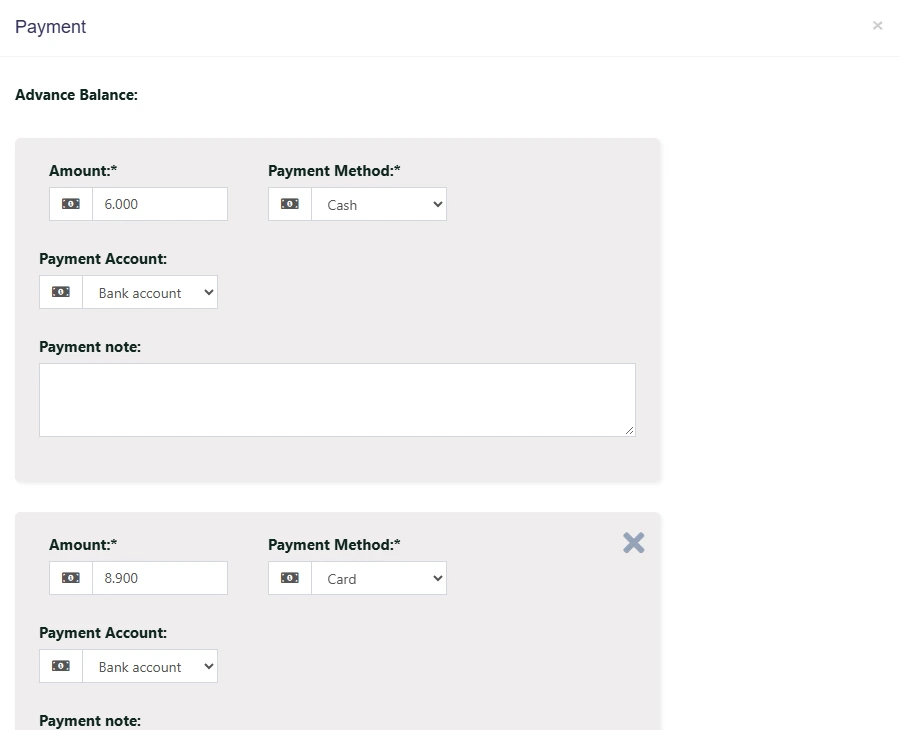
-
Open payment
In Orders open payment for the right order and see what was already paid.
-
First method
Choose the first method (e.g. cash) and enter the amount.
-
Add the second
Add the card with the amount confirmed on the terminal. If paid on two visits, record a new payment on the balance.
-
Check payments
Open the invoice's payment history and match each method.
Fields and buttons
| Field or button | When to use it | Result and how to check |
|---|---|---|
| Amount due | Use the outstanding amount if a previous payment applies and confirm the current total. | The tender lines sum to the amount being collected. |
| Method and amount per line | Enter cash, terminal or other eligible payment as separate lines with actual amounts. | A KWD 8.000 invoice with KWD 3.000 cash and KWD 5.000 card has two tender lines on the same reference. |
| Terminal reference | After terminal success, record its reference where prompted. | Match the reference to the terminal and check shift collections. |
| Confirm payment | Review each amount and total before confirming. Some channel menus restrict tender. | Open invoice history and confirm previous and new payments are recorded correctly. |
Worked example
A practice split
For a KWD 12.750 invoice, receive KWD 5.000 in cash and KWD 7.750 by card. The outstanding balance is zero and this sale adds KWD 5.000 to the drawer.
From ChatGPT or Claude
Once KEMET is connected to your assistant, copy and send this request:
Show the payments on this invoice by payment method.
The assistant reads data right away. Any change is shown to you in KEMET for approval before it runs, within your account permissions only.
Tools the assistant uses here
restaurant_list_order_paymentsrestaurant_get_order_balancerestaurant_native_sell_sales_by_payment_method
Verify the result
- The invoice history separates receipts by method.
- Terminal and drawer reconciliation uses each method's own amount.
Common problems
A payment seems duplicated after a disconnect
Compare the invoice payment reference against the terminal reference. Get accounting review before correcting either payment.
A payment method is absent
Check branch payment settings, settlement mapping, service type and the open shift.
For: Cashier Branch manager Accountant
Screens and buttons depend on your account permissions and branches. Images show KEMET with training data.