
Configure delivery zones, fees and minimums
Set each zone’s branch, coverage, fee and lead time, then test one address inside the coverage and another outside it.
Steps
-
Add the zone
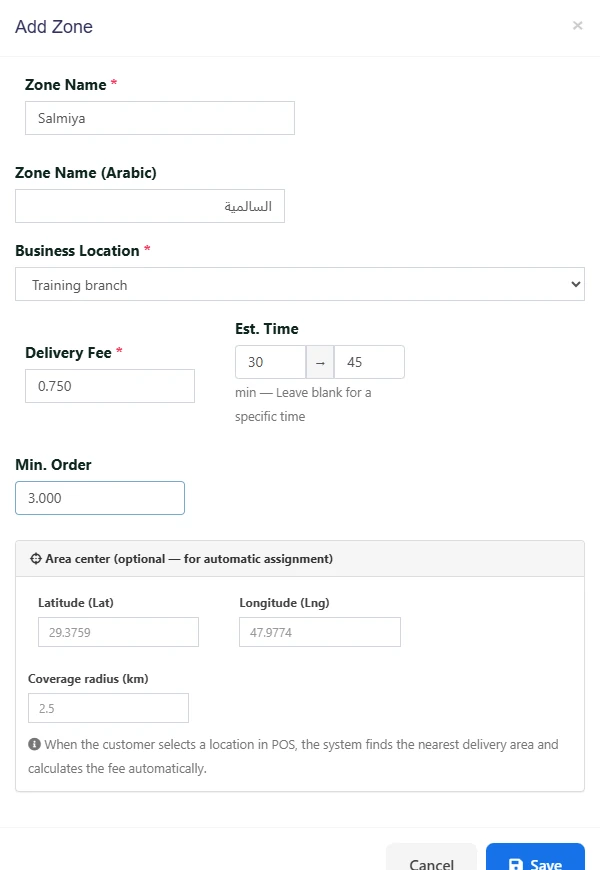
Open Delivery zones and click Add zone. Enter the name and choose the branch that delivers.
-
Set fee, time and minimum
Enter the delivery fee, estimated time and minimum order. For radius delivery, set the zone centre and radius.
-
Test from the store
Place a test order with an address inside and one outside, and one below the minimum. You see fee and time before confirming.
-
Update when coverage changes
If delivery stops for a zone, deactivate it. If the whole branch stops, use store hours or the temporary pause.
Fields and buttons
| Field or button | When to use it | Result and how to check |
|---|---|---|
| Zone name | Use the customer-facing area name in supported languages. | Verify the area can be selected from the delivery address. |
| Branch and assignment | Check the storefront's serving branch for this area. | Test both serving and out-of-scope branch choices. |
| Fee and minimum | Set the fee and eligible minimum in the branch's configuration. | Match the quoted delivery fee to area settings before checkout. |
| Saved address or map pin | Choose the actual area and verify any map pin before dispatch. | If delivery is unavailable, check area, branch and service hours. |
| Checkout test | Test a covered address and an outside address and review the quote or warning. | Verify the confirmed order reached its branch with the same address and fee. |
Worked example
Separate delivery fee and minimum
Training example. The fee is KWD 1.000 and the order minimum is KWD 5.000. Test an address inside the zone with carts of KWD 4.500 and KWD 6.000. Check the limit in the first and the fee before payment in the second.
From ChatGPT or Claude
Once KEMET is connected to your assistant, copy and send this request:
Show delivery zones and fees, and add Salmiya with a 0.750 fee.
The assistant reads data right away. Any change is shown to you in KEMET for approval before it runs, within your account permissions only.
Tools the assistant uses here
restaurant_list_delivery_zonesrestaurant_propose_create_delivery_zonerestaurant_propose_update_delivery_zone
Verify the result
- The test address is matched to the intended zone and fulfilling branch.
- The fee, minimum and delivery estimate displayed to customers match the intended setup.
Common problems
A configured zone is unavailable at checkout
Check branch, zone status, delivery availability and opening hours, then compare the address with the zone boundary.
A specific address shows unexpected fees
Check which zone was selected and any free-delivery threshold, channel policy or branch override.
For: Restaurant owner Branch manager
Screens and buttons depend on your account permissions and branches. Images show KEMET with training data.