
Configure and test storefront payment methods
Choose the tenders customers see and verify that prepaid payments reconcile to the intended order before going live.
Steps
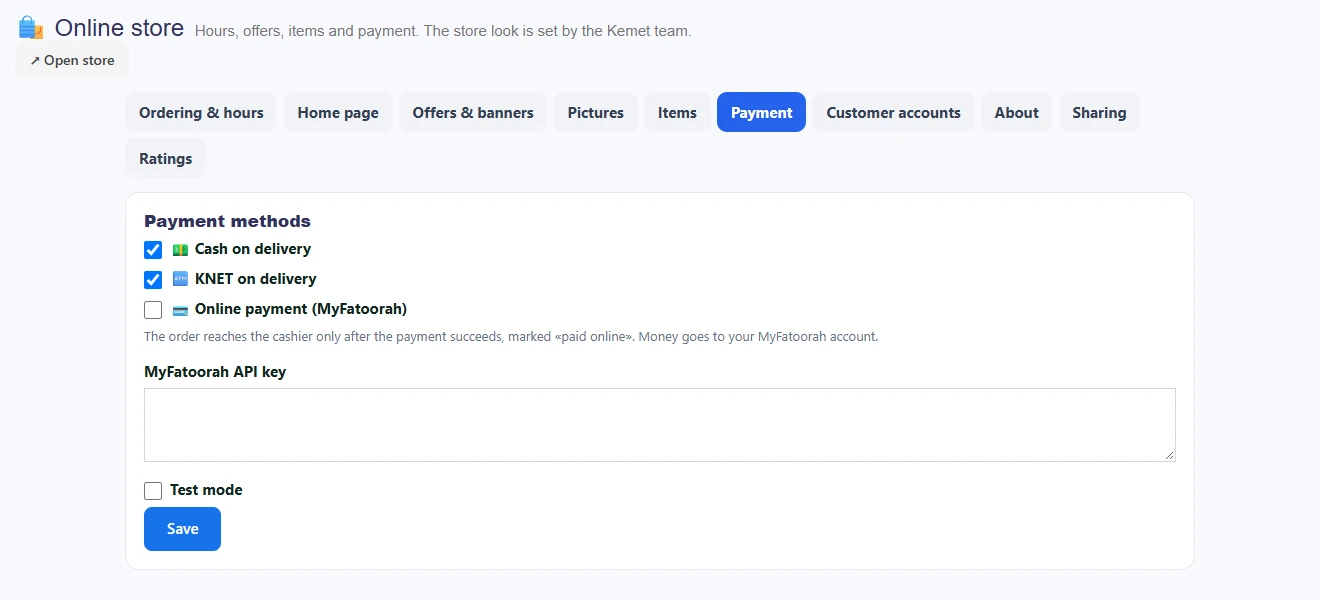
-
Choose payment methods
In Online store → Payment, tick cash on receipt, KNET on receipt or online payment.
-
Online payment setup
If you use MyFatoorah, enter the key and test mode with the administrator.
-
Test from a customer phone
Place a test order with each enabled method and see the payment status on the order.
-
Match payment and order
Compare the payment reference with the KEMET order. If an online payment is stuck, check Payment issues before a new order.
Fields and buttons
| Field or button | When to use it | Result and how to check |
|---|---|---|
| Cash | Enable only where the branch can actually collect cash for that fulfillment type. | Order shows amount due and payment is verified on the invoice. |
| Card or online payment | Enable an authorized method and configure its integration. Verify order state in the supported test path. | Compare confirmed amount and reference when checkout returns. |
| Payment needs review | Capture the provider reference, branch and attempt time and reconcile before a second payment. | Review state on the order and provider record. |
| Settlement | Once bank credit is visible, verify net deposit and fees from the settlement screen. | Use one matching reference across provider, statement and posting where enabled. |
Worked example
Prepayment versus a terminal on receipt
Training example. A customer chooses KNET on receipt, so the employee verifies collection at handover. Another customer pays online, so the employee verifies the gateway result and order status before completing handover.
From ChatGPT or Claude
Once KEMET is connected to your assistant, copy and send this request:
Show the payment methods enabled in the online store.
The assistant reads data right away. Any change is shown to you in KEMET for approval before it runs, within your account permissions only.
Tools the assistant uses here
restaurant_get_storefront_checkout_configuration
Verify the result
- The intended payment methods appear in the chosen storefront channel.
- A prepaid transaction can be traced from the order to the provider without being recorded twice.
Common problems
Online payment is unavailable at checkout
Verify that it is enabled, that a valid gateway is configured, and that the selected channel permits the method.
The gateway succeeded but the order does not appear immediately
Check payment issues and the attempt’s reference with the administrator. Reconcile that attempt before collecting again.
For: Restaurant owner Branch manager Accountant
Screens and buttons depend on your account permissions and branches. Images show KEMET with training data.