
Reconcile Casheer payouts to the bank
Link confirmed online receipts, deductions for refunds and fees to the actual net deposit on the bank statement.
Steps
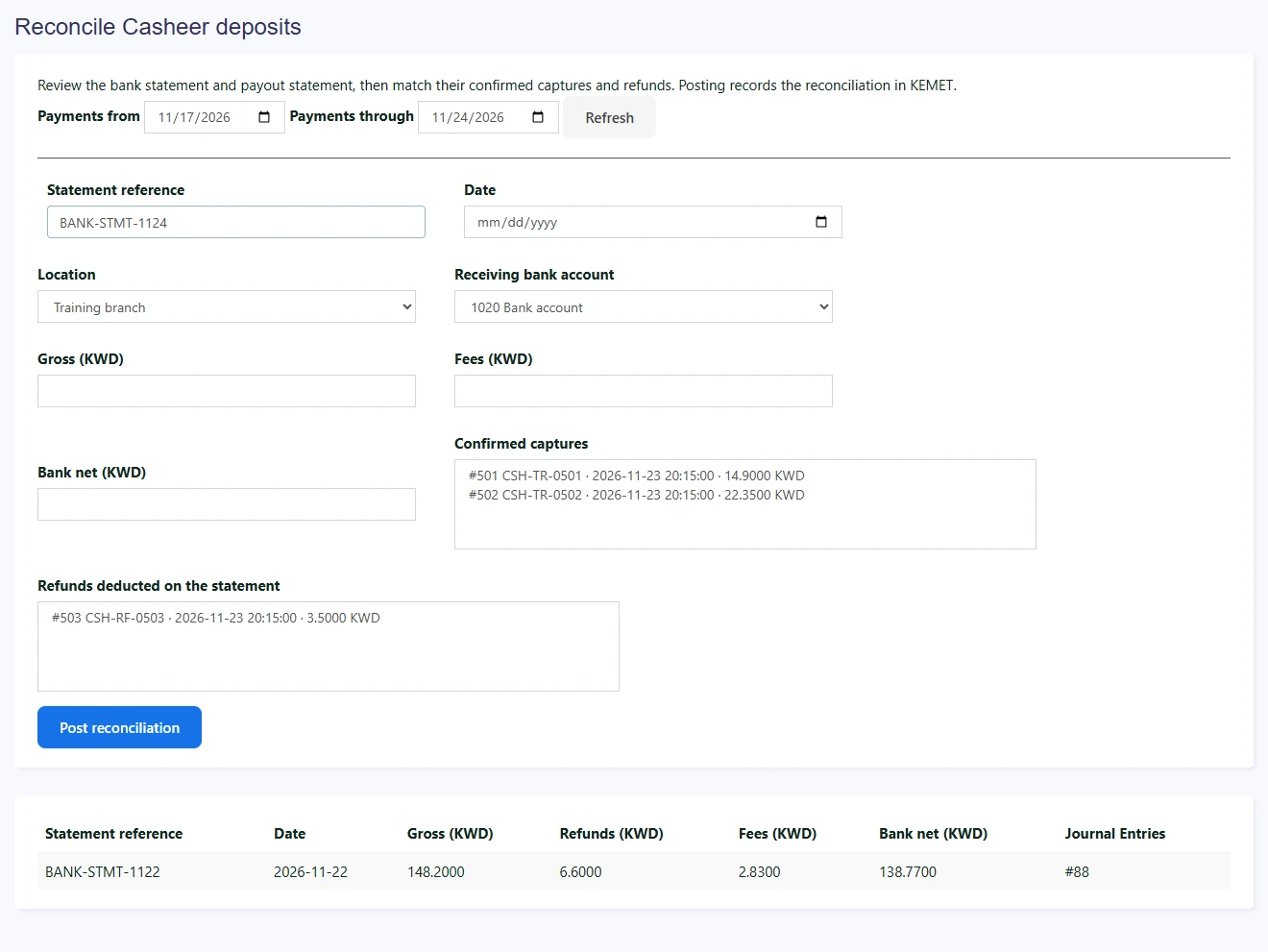
-
Open deposit matching
In Finance open “Match Casheer deposits to bank statement” and enter the statement reference.
-
Choose payments and refunds
Select the confirmed receipts and refunds on the statement and enter the fees.
-
Match the bank
Choose the bank account. The net deposit must equal the amount actually received.
-
Post and check the entry
Click Post settlement, open the entry and check deposit and fees.
Fields and buttons
| Field or button | When to use it | Result and how to check |
|---|---|---|
| Statement settlement reference | Use the exact settlement reference and check it was not recorded earlier. | Find it in settlement history and the journal source. |
| Confirmed receipts | Use confirmed collections included in that statement. | Reconcile payment references, branch and collection status for any difference. |
| Deducted refunds and fees | Enter actual statement refunds and fees. Follow pending payments from their source. | KWD 100.000 less KWD 10.000 refunds and KWD 2.000 fees equals KWD 88.000. |
| Receiving bank account / Net deposit | Select the receiving account and reconcile calculated net to bank credit. | After Post reconciliation, check bank, fee and gateway clearing accounts according to the mapping. |
Worked example
KWD 100 collected, KWD 10 refunded and KWD 2 fees
Training example. KWD 100.000 confirmed receipts less KWD 10.000 statement refunds and KWD 2.000 fees yields KWD 88.000 deposited.
From ChatGPT or Claude
Once KEMET is connected to your assistant, copy and send this request:
Show recent online-payment settlements with the bank.
The assistant reads data right away. Any change is shown to you in KEMET for approval before it runs, within your account permissions only.
Tools the assistant uses here
restaurant_list_gateway_statement_reconciliationsrestaurant_list_branch_payment_link_statusrestaurant_report_payment_link_conversion
Verify the result
- Net deposit matches the bank statement and the settlement has a unique reference.
- Unresolved collections or refunds remain traceable at their source.
Common problems
Net amount does not match the bank
Check interval payments, refunds, fees, transfer date and transaction states. Record after resolving the difference.
Clearing or fee account is invalid
Review same-company account mappings and use the approved account for that posting role.
For: Accountant Branch manager Restaurant owner
Screens and buttons depend on your account permissions and branches. Images show KEMET with training data.