
Cancel a preorder and return its deposit
Open the original booking and choose the cancellation flow from its preparation and actual payment state.
Steps
-
Find the booking
In Preorders search by booking number or fulfilment date and check status and paid amount.
-
Cancel the booking
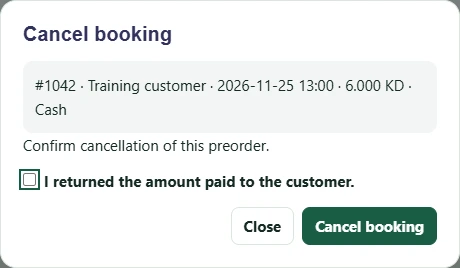
Click Cancel booking. If preparation started and an invoice exists, make a return with the manager instead.
-
Refund the deposit, then confirm
If a deposit was paid, give it back first, then tick “I returned the payment to the customer”.
-
Check the status
Reopen the booking. It shows Cancelled with the deposit refund.
Fields and buttons
| Field or button | When to use it | Result and how to check |
|---|---|---|
| Booking number and fulfillment date | Find by fulfillment date and verify branch and status. | If already released and invoiced, use the source invoice to find the eligible follow-up. |
| No payment | For an eligible booked order without deposit, verify Paid before canceling. | Confirm Canceled and verify there is no refund for an unpaid booking. |
| Paid deposit | Verify original tender, amount and available action. Confirm actual refund when required. | Match refund reference and booking. A KWD 5.000 deposit is checked against the eligible amount. |
| Cancellation reason or confirmation | Enter a clear reason when prompted and verify the selected booking. | If state changed, refresh and reopen the same booking. |
| After cancellation | Check booking, amounts and payment references, including terminal or provider refund. | Trace the payment source and verify it was recorded once. |
Worked example
Part-paid booking before preparation
In a demo, cancel a booking before preparation after collecting KWD 5.000. After the actual refund and confirmation, verify one deposit refund entry and a Cancelled booking.
From ChatGPT or Claude
Once KEMET is connected to your assistant, copy and send this request:
Cancel this preorder and record that the deposit was returned in cash.
The assistant reads data right away. Any change is shown to you in KEMET for approval before it runs, within your account permissions only.
Tools the assistant uses here
restaurant_list_preordersrestaurant_propose_cancel_unpaid_preorderrestaurant_propose_cancel_and_refund_cash_preorder
Verify the result
- An unpaid booking closes with no drawer payout.
- The paid booking shows its refund reference, with the original receipt and refund separately traceable.
Common problems
The state changed during cancellation
Refresh the booking and check whether another employee recorded an invoice, preparation action or payment.
The refund is not confirmed
Check the payment method and reference. Confirm the outcome in the booking history or provider status before retrying.
For: Cashier Branch manager Accountant
Screens and buttons depend on your account permissions and branches. Images show KEMET with training data.