
Book a preorder with a deposit or full payment
Schedule pickup or delivery, select how much to take at booking and track the total, paid and remaining amounts under one reference.
Steps
-
Build the order
In POS choose the branch and order type and add items and the customer.
-
Click Book order
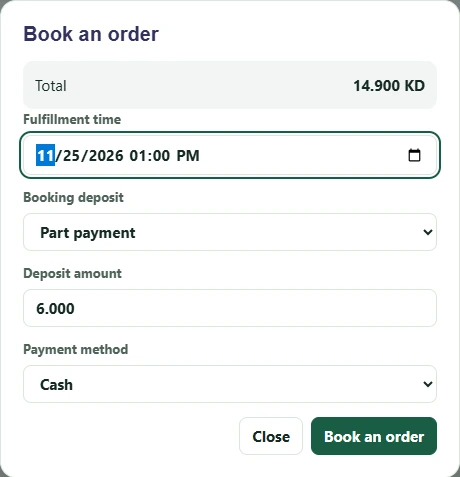
In the cart click Book order and choose the fulfilment date and time.
-
Choose payment
No payment, Partial or Full. For partial, enter the amount received and its method.
-
Check the booking
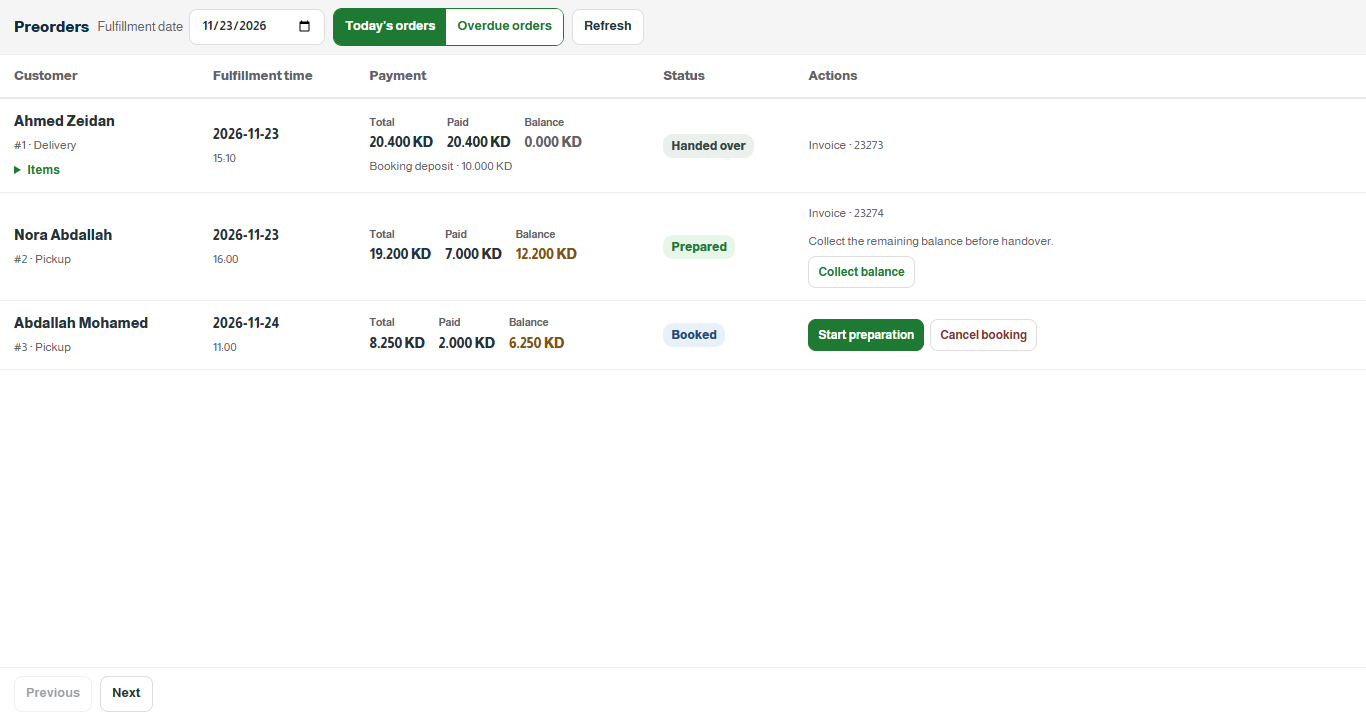
Open Preorders on the fulfilment date. It shows Booked with paid and balance.
-
The invoice starts with preparation
The deposit is recorded as an advance on the booking. Invoice and stock happen when preparation starts.
Fields and buttons
| Field or button | When to use it | Result and how to check |
|---|---|---|
| Fulfillment type | Choose Pickup or Delivery for the agreed time. Confirm branch and address where needed. | Table reservations and dine-in service use the separate tables workflow. |
| Fulfillment time | Select a future local date and time. After midnight check the displayed date. | Find the booking under the chosen fulfillment date in Preorders. |
| No payment / Part payment / Full payment | Select the option that matches what was received. Part payment requires amount and actual tender. | Verify Paid and Balance on the booking row before leaving. |
| Receive booking deposit | When KWD 5.000 was received on a KWD 14.900 booking before preparation starts. | With payment mappings configured, the deposit records a customer advance. Due is KWD 9.900, and the booking remains booked until released. |
| Start preparation | Use it when the restaurant is ready to start order fulfillment and your role permits release. | Open the linked invoice and confirm the advance was applied once. |
| Payment does not match booking | Check the active shift, advance account mapping and tender eligibility for this menu. | Payment records and invoice show actual receipt and allocation. |
Screen images
Worked example
A KWD 14.900 preorder
Training example. Collect KWD 5.000 on a KWD 14.900 booking. The booking is Booked, paid is KWD 5.000 and balance is KWD 9.900. When preparation starts, verify the deposit was applied once.
From ChatGPT or Claude
Once KEMET is connected to your assistant, copy and send this request:
Book a pickup order for tomorrow at 1 pm with a 6 KD cash deposit.
The assistant reads data right away. Any change is shown to you in KEMET for approval before it runs, within your account permissions only.
Tools the assistant uses here
restaurant_propose_create_cash_deposit_preorderrestaurant_propose_create_pickup_preorderrestaurant_list_preorder_payment_events
Verify the result
- The booking appears on the chosen fulfilment date even when payment was received on another day.
- Before preparation, the payment is linked to the booking, with the invoice and kitchen ticket created later.
Common problems
The booking is absent in Today's orders
Set the fulfilment date filter. Check the booking reference and branch if it was scheduled for later.
Partial payment is unavailable
Check collection permission, the open shift, payment method and customer advances account.
For: Cashier Branch manager Accountant
Screens and buttons depend on your account permissions and branches. Images show KEMET with training data.