
Correct an incorrectly issued waste return
Review correction eligibility and reverse from the source while preserving the posted audit trail and saleable stock.
Steps
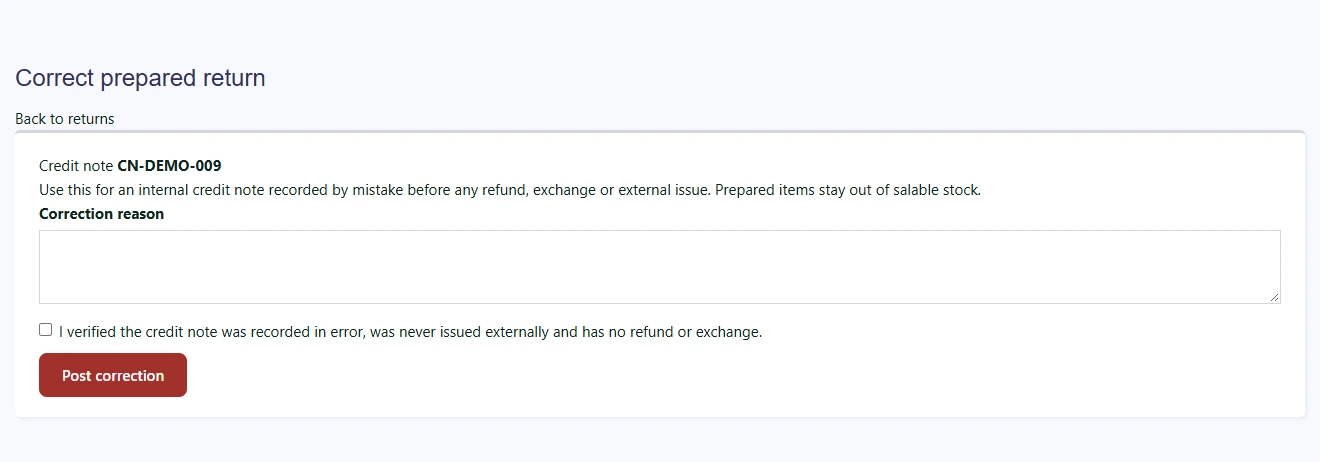
-
Open the note
Match the note, invoice and wrongly recorded item, and check any refund or allocation.
-
Use the correction
If eligible, click the correction action and enter the reason. Check what will be reversed before confirming.
-
Check the reversal
In Return journals see the reversing entry and waste register.
-
Record the right return if needed
If a real return remains, record it from the original invoice with the right quantity and condition.
Fields and buttons
| Field or button | When to use it | Result and how to check |
|---|---|---|
| Credit note and original invoice | Check both references, branch and affected line first | The correction traces back to the source return. |
| Refund and settlement state | Inspect funding effects ahead of correction | An existing refund or linked settlement can block this route. Review the state with accounting. |
| Item quantity and condition | Check the affected quantity and actual condition | Eligible effects are reversed or corrected according to state. Trace physical waste in inventory. |
| Correction reason | Enter an auditable reason before confirming | The reason and correction remain traceable in credit-note history. |
| History and journals | After saving, verify the original note and correction effects | Review corrected balances and linked journal references before taking further action. |
Worked example
Wrong invoice selected
Training example. A waste credit note was attached to the wrong invoice and no refund or allocation took place. Accounting reviews eligibility, records the reason and checks the invoice balance before creating a correct note if needed.
From ChatGPT or Claude
Once KEMET is connected to your assistant, copy and send this request:
Show the waste posting on this return and retry it if it failed.
The assistant reads data right away. Any change is shown to you in KEMET for approval before it runs, within your account permissions only.
Tools the assistant uses here
restaurant_get_return_waste_postingrestaurant_propose_retry_return_waste
Verify the result
- Original and reversing journals are linked and the note displays its corrected status.
- Food already disposed of stays out of saleable stock after correction.
Common problems
The correction action is locked
Review note status, linked refunds or allocations, period and branch access. Accounting should choose the correction available from the source.
The original journal is still visible after reversal
Trace original and reversal links from the note and reconcile their net effect before editing another document.
For: Accountant Branch manager
Screens and buttons depend on your account permissions and branches. Images show KEMET with training data.