
Review damage and waste cost on a return
Support the cost from the original sale movement and track its posting from the credit note while the food stays out of saleable stock.
Steps
-
Start from the credit note
Open return details → Return journals. If it says waste cost under review, note those lines.
-
Match the original sale
From the invoice see the batches or recipe components issued at sale and compare with cost of sales.
-
Retry posting
If everything matches and you have permission, click Verify cost and retry posting.
-
Check lines and waste
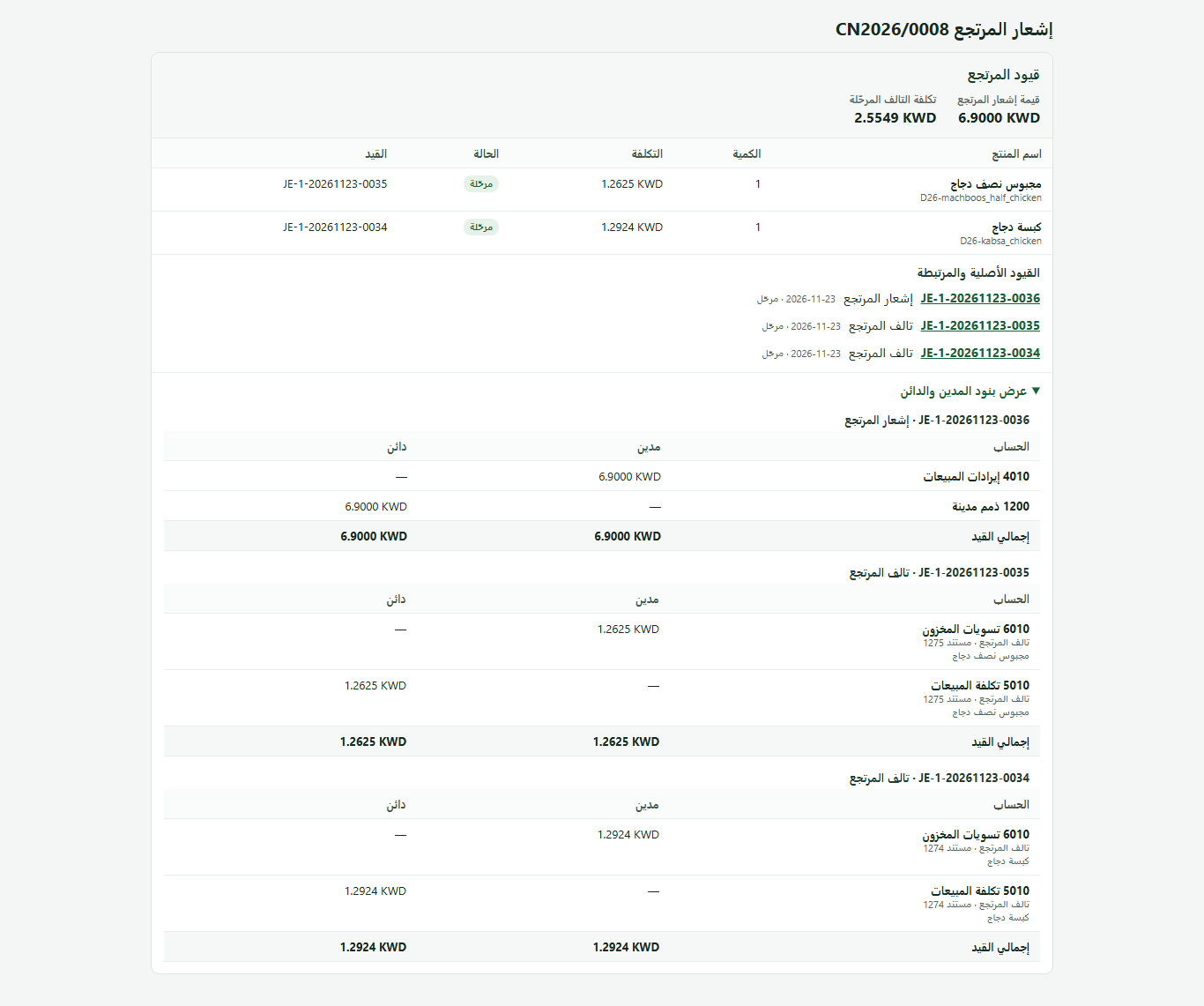
Open debit and credit lines. Cost moves to the waste account. Check the waste register.
Fields and buttons
| Field or button | When to use it | Result and how to check |
|---|---|---|
| Credit note | Open the note and the damaged or waste line | The meal remains outside saleable stock in this state. |
| Invoice and cost layer | Match the original stock issue against the COGS journal | Cost follows the originally issued quantity, lot and value. |
| Customer refund | Review the eligible amount and actual tender | The credit note tracks refund and waste-cost posting with their own states. |
| Verify cost and retry posting | Use after reconciling historical cost evidence | Check the resulting state and journal before retrying. If evidence is still missing, review the original sale. |
| Debit and credit lines | Open the accounting breakdown after posting | With costs of 1.2924 and 1.2625, 2.5549 moves from cost of sales into the mapped waste expense. |
Worked example
Original sale cost of 1.2924
Training example from the journal preview. An item with proven cost of KWD 1.2924 debits 6010 Inventory Adjustment and credits 5010 Cost of Goods Sold. Your account names depend on configuration.
From ChatGPT or Claude
Once KEMET is connected to your assistant, copy and send this request:
Show waste cost on recent returns.
The assistant reads data right away. Any change is shown to you in KEMET for approval before it runs, within your account permissions only.
Tools the assistant uses here
restaurant_get_return_waste_postingrestaurant_report_losses
Verify the result
- Waste value matches the supported historical issue cost and credit note reference.
- Damaged items did not increase saleable stock and retry did not create duplicate postings.
Common problems
New stock did not resolve historical cost
Review the lots and journal at the original sale. Later receipts have their own references and costs. Historical cost needs the matching original evidence.
A zero cost is displayed
Open line status and determine whether the zero is supported or the line still needs review. Inspect details before closing the accounting review.
For: Accountant Branch manager Kitchen team
Screens and buttons depend on your account permissions and branches. Images show KEMET with training data.