
Read sales, kitchen, delivery and channel performance
Use restaurant reports to explain bottlenecks and sales changes, then trace operating metrics to their source before acting.
Steps
-
Sales
Open the sales report, choose branch and period, and group by day, order type or payment.
-
Kitchen
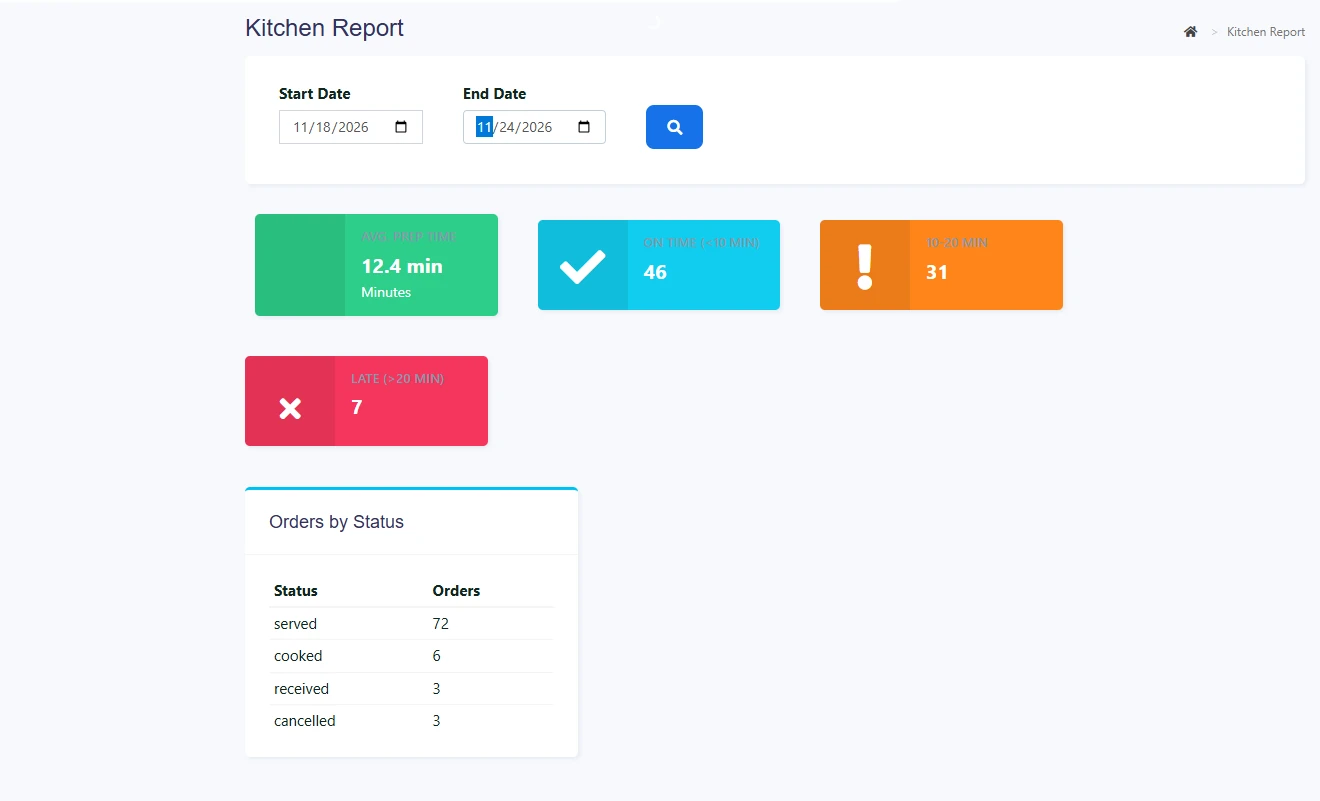
The kitchen report shows average preparation time, time buckets and orders by status.
-
Delivery
The delivery report separates delivered from failed. Open Delivery management for a single order.
-
Channels
The channel report is for sales only. Commission and net are in the channel statement and settlement.
Fields and buttons
| Field or button | When to use it | Result and how to check |
|---|---|---|
| Period and branch | Set identical filters before comparing reports | A week-over-week comparison uses the same number of business days and matching locations. |
| Sales and channels | Inspect channel and order type before comparing sales to receipts | Issued invoice value and actual collections are distinct movements. |
| Kitchen report | Review the states and recorded transitions | If times are missing, confirm kitchen stations recorded their state changes. |
| Delivery report | Compare dispatched, delivered and failed orders in the same location | Trace a missing order through fulfillment status, assignment and source. |
| Follow-up action | Select two actual records and open their source documents | Isolates a specific operational issue such as kitchen wait or driver assignment delay. |
| Deleted invoices | Find a whole deleted invoice by deletion date, branch, user and order type | Read the original invoice reference, amount and reason from the deletion log with the appropriate permission. |
| Deleted invoice items | When one item was removed, use the line report for that removal | Inspect item name, quantity, line value, source reference and operator. |
| Report date range | Use the time when the deletion occurred | The report filters on action time. For a long list, narrow the period, branch and user. |
| Compare with a credit note | When a customer returns a posted sale, open the returns report | Review the credit note and actual payout using their references. The deletion report documents logged administrative actions. |
Worked example
Preparation slowed alongside higher volume
Training example. One branch moved from a 12-minute average to 18 minutes, with most new cases in the 10- to 20-minute bucket. Check how many orders had a completion recorded and compare their order types before changing the kitchen plan.
From ChatGPT or Claude
Once KEMET is connected to your assistant, copy and send this request:
Show this week's kitchen turnaround and delivery outcomes.
The assistant reads data right away. Any change is shown to you in KEMET for approval before it runs, within your account permissions only.
Tools the assistant uses here
restaurant_report_kitchen_turnaroundrestaurant_report_delivery_outcomesrestaurant_report_sales_by_channelrestaurant_report_waiter_response
Verify the result
- The comparison uses the same branch, periods of equal length and an explicit filter.
- Order or invoice references substantiate the result.
Common problems
Kitchen average is blank even though orders appear
Check whether cooking completion was recorded. Orders without a completion timestamp can still appear in status counts.
Channel sales differ from the bank deposit
Review dates, commissions, settlement rules and payment states. Open the channel statement and linked payments to explain the difference.
For: Restaurant owner Branch manager Accountant Kitchen team
Screens and buttons depend on your account permissions and branches. Images show KEMET with training data.