
Configure service types, price groups and packing charges
For companies using service types, assign branch price groups and packing charges and verify them in the supported sales workflow.
Steps
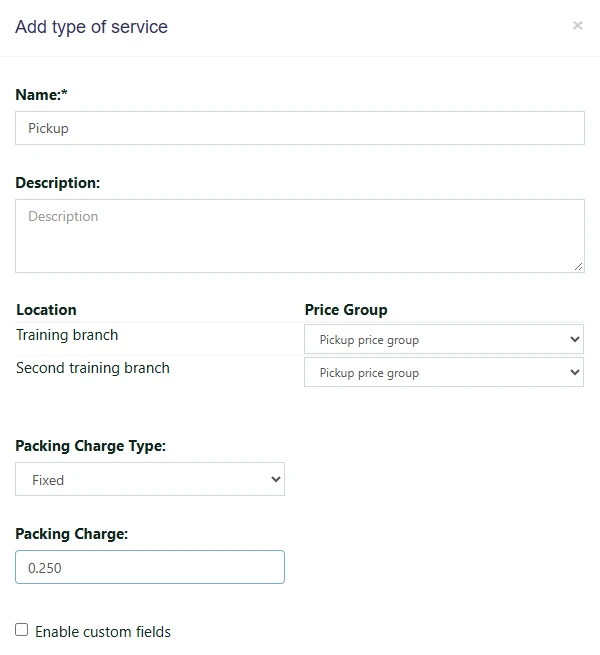
-
Open service types
In Settings → Types of service open one or click Add.
-
Name and branch prices
Enter the name and choose a price group for each branch.
-
Packing charge
Choose fixed or percentage and enter the value.
-
Test in an order
Choose the service type in a training sale and check price, packing and total.
Fields and buttons
| Field or button | When to use it | Result and how to check |
|---|---|---|
| Name and description | Choose a recognizable service type name for cashiers. | Verify its displayed name in the supported sales flow. |
| Location and price group | Select the intended price group for each listed branch. | Verify one known item's price in each affected branch. |
| Packing charge type and amount | Choose Fixed or Percentage and enter the approved charge. | Verify charge and total in a training invoice before staff use. |
| Enable custom fields | Enable when more details are required in the supported sales flow. | Select the service type on a sale and verify fields. |
Worked example
Fixed packing charge
Training example. For a KWD 4.500 item with a fixed KWD 0.250 packing charge, verify KWD 4.750 before tax, other fees or discounts where the rule applies.
From ChatGPT or Claude
Once KEMET is connected to your assistant, copy and send this request:
Show service types and their charges in my branch.
The assistant reads data right away. Any change is shown to you in KEMET for approval before it runs, within your account permissions only.
Tools the assistant uses here
restaurant_list_pos_service_type_rulesrestaurant_report_invoice_service_charges
Verify the result
- The authorized branch can choose the service type and fees follow configuration.
- The training invoice matches the cart price and charge.
Common problems
The service type is missing
Check module, permissions and the supported sales screen. Review POS order types and menus if they use their own configuration.
Packing charge is higher than expected
Check fixed or percentage mode, value, price group and discounts in the same branch.
For: Restaurant owner Branch manager Cashier
Screens and buttons depend on your account permissions and branches. Images show KEMET with training data.