
Return goods to a supplier from the purchase invoice
Link the return to the purchase invoice and reconcile stock leaving the branch with the supplier settlement.
Steps
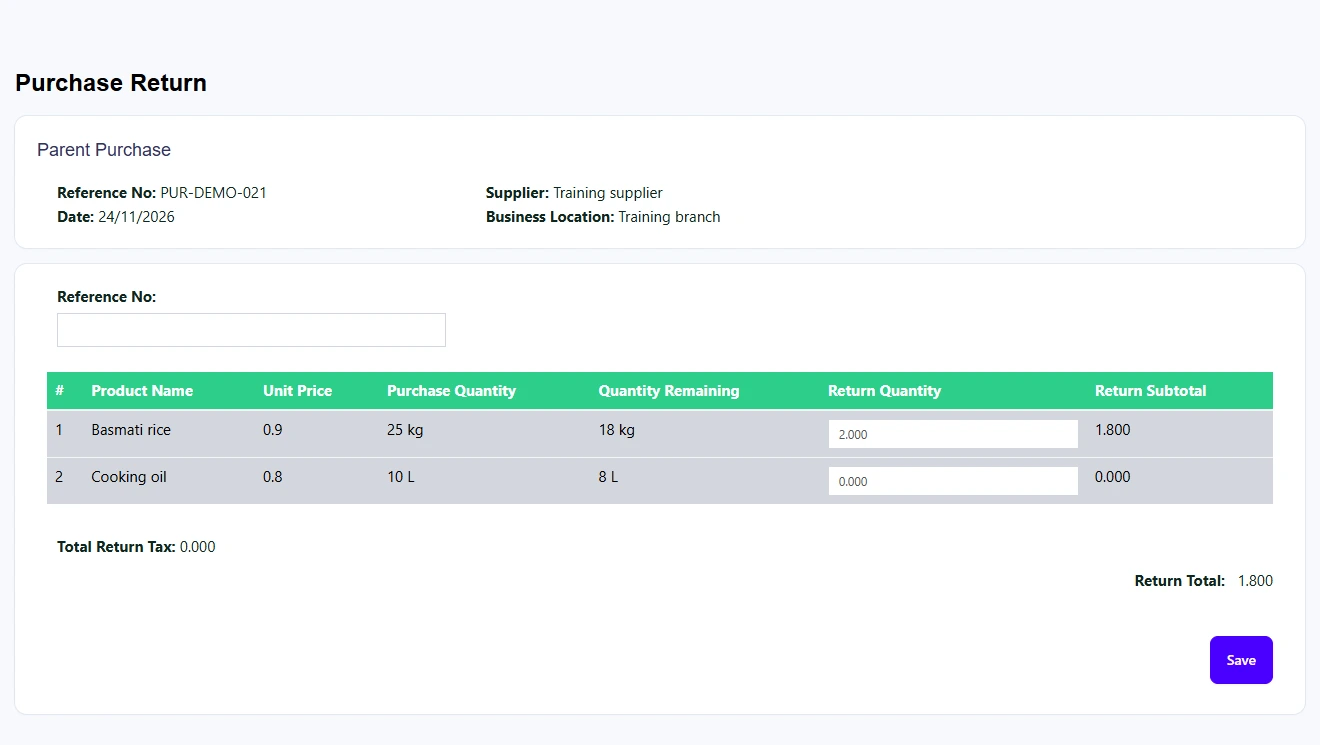
-
Open the purchase invoice
In Purchases → List purchases find the invoice and click Purchase return.
-
Choose items and quantities
Enter the quantity actually returned. If batches are used, choose the right batch.
-
Check the value
Compare the return total and tax with the supplier document, and enter the reference.
-
Settle with the supplier
After saving, the supplier either reduces what you owe or refunds money. Check their ledger.
-
Check stock and entry
See the item's movement in the branch, and the entry if accounting is on.
Fields and buttons
| Field or button | When to use it | Result and how to check |
|---|---|---|
| Original purchase invoice | Start the return from the source purchase where available | The source line helps reconcile both lot quantity and cost. |
| Return quantity | Enter available stock for the same item and unit | For 12 received and 2 returned, verify 10 net purchased before other movements. |
| Supplier and branch | Match the supplier and the location that issued the goods | The stock issue and document follow the recorded branch and supplier. |
| Supplier credit reference | Keep the supplier’s reference and confirmation date | Reconcile the credit on the supplier statement and trace any cash movement to its own settlement record. |
| Stock movement and journal | Open return details after saving | Check the value issued, the return total and linked accounts under the company setup. |
Worked example
Returning three oil units
An invoice listed 12 units at KWD 2.000 each. Three went back to the supplier, for KWD 6.000 before tax or discount. Verify the stock reduction and the supplier settlement document.
From ChatGPT or Claude
Once KEMET is connected to your assistant, copy and send this request:
Return 2 kg of rice to the supplier from this invoice.
The assistant reads data right away. Any change is shown to you in KEMET for approval before it runs, within your account permissions only.
Tools the assistant uses here
restaurant_propose_create_supplier_returnrestaurant_propose_add_supplier_return_itemsrestaurant_get_purchase_return_history
Verify the result
- The return points to the original supplier invoice and branch.
- Stock decreased once and the settlement matches the vendor document.
Common problems
Fewer units are available to return
Check earlier returns, issue or transfer movements and the lot status. Follow the original source document to resolve a discrepancy.
The return exists, but the supplier has not refunded it
Track the amount in the supplier ledger and record the settlement when it actually occurs.
For: Branch manager Accountant Purchasing and stock
Screens and buttons depend on your account permissions and branches. Images show KEMET with training data.