
Accept an external channel order and check item mapping
Check branch, channel, item mappings and payment before acceptance, then trace the invoice and kitchen order by channel reference.
Steps
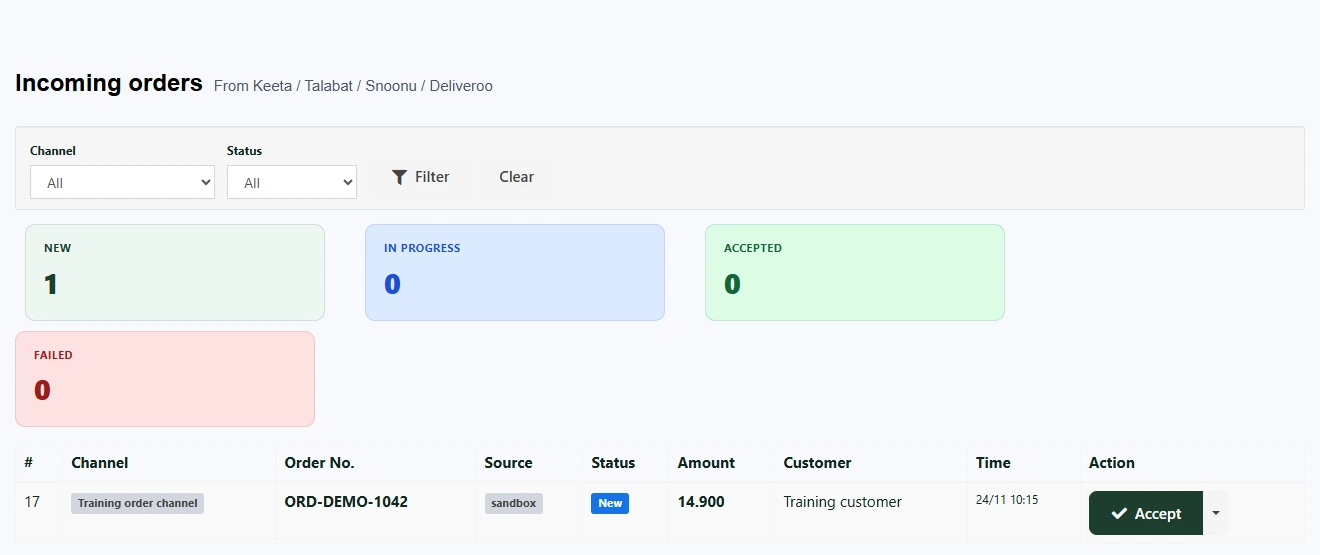
-
Open incoming orders
Open channel incoming orders and filter by branch or channel. Search the order number before creating a manual order.
-
Check the order and items
Open the preview and check customer, value and payment. Make sure each channel item is mapped to a menu item.
-
Accept or reject
If everything matches, click Accept once. If you cannot fulfil it, reject it from the same order.
-
Follow the invoice and delivery
After acceptance an invoice is created and sent to the kitchen. If the channel collected payment, match it in channel settlement.
Fields and buttons
| Field or button | When to use it | Result and how to check |
|---|---|---|
| Channel and external reference | Match channel, branch and external order number before reviewing. | Search by the same reference after processing or repeat notifications. |
| Order state and payment state | Read New, Processing, Accepted, Failed or Rejected and check recorded tender. | If the channel collected, check settlement before recording additional payment. |
| Unmapped items | Open the preview and match external item ID to the channel menu item. | Verify mapping, modifiers and price before acceptance. |
| Accept / Reject | Use the action from the existing request after branch, lines and fulfillment are checked. | The correct reference links invoice and kitchen, or records rejection status. |
Worked example
An order arrives with an unmapped item
Training example. A channel order includes a burger bundle with a new ID. Open the preview, verify the intended menu item with the menu manager, and match options and line prices on the same request before accepting.
From ChatGPT or Claude
Once KEMET is connected to your assistant, copy and send this request:
Show new delivery-platform orders and tell me if any item is not mapped.
The assistant reads data right away. Any change is shown to you in KEMET for approval before it runs, within your account permissions only.
Tools the assistant uses here
restaurant_list_incoming_online_ordersrestaurant_list_channel_product_mappingsrestaurant_list_ordering_channel_configuration
Verify the result
- The channel reference links to a single invoice in the correct branch.
- Kitchen items and payment status reconcile to the channel reference.
Common problems
An incoming order is failed or still processing
Open details and inspect error, invoice reference and item mapping. Choose the available recovery only after checking the same reference's latest state.
An order appears collectible but the channel shows paid
Compare the channel payment evidence and order reference. Ask management to verify tender mapping or the channel receivable before collecting from the guest.
For: Cashier Branch manager Kitchen team Accountant
Screens and buttons depend on your account permissions and branches. Images show KEMET with training data.