
Collect at delivery and reconcile the driver's cash
Review paid and due amounts, record actual tender, and match the driver's shift collections to cash handed over at the branch.
Steps
-
Know the amount before handover
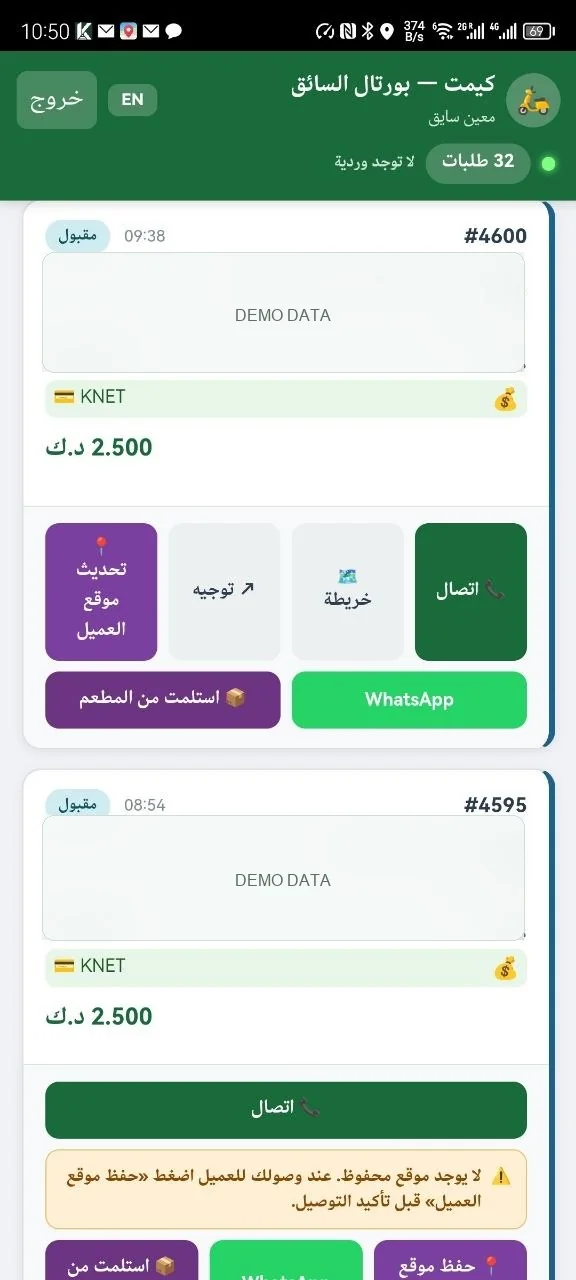
In the driver portal open the order. You see the total, what is paid and what to collect.
-
Record the actual payment
At delivery choose the method you actually received. Count cash before confirming.
-
Check the status
The order shows Delivered and the payment appears on the same invoice. If it lags, refresh before repeating.
-
Hand over cash at shift end
Match the cash you hold with the shift's delivery payments and hand it to the supervisor.
Fields and buttons
| Field or button | When to use it | Result and how to check |
|---|---|---|
| Amount due | Check invoice total and prior payments before handover. | Outstanding can differ from invoice total after deposits, online payment or credits. |
| Actual tender and reference | Record the tender actually received and terminal reference when required. | Verify one collection posting on the order invoice. |
| Driver shift | Use the authorized shift at the correct branch and point where required. | If blocked, check shift, collection point and order status. |
| Delivered | After actual delivery and required payment, verify order and outstanding amount. | If terminal succeeded and KEMET is pending, inspect that reference before retrying. |
| Driver report and cash settlement | Match actual collection to shift payment lines before handing over cash. | Example: KWD 8.000 prepaid and KWD 6.500 COD total KWD 14.500, with KWD 6.500 in actual cash before other movements. |
Worked example
Two invoices with one cash collection
Training example. A driver has a prepaid KWD 8.000 order and a KWD 6.500 COD order. If only cash was collected, the invoices total KWD 14.500 while actual cash collected is KWD 6.500 before opening float or other movements.
From ChatGPT or Claude
Once KEMET is connected to your assistant, copy and send this request:
Show cash-on-delivery orders with drivers and amounts not yet handed in.
The assistant reads data right away. Any change is shown to you in KEMET for approval before it runs, within your account permissions only.
Tools the assistant uses here
restaurant_list_delivery_dispatchrestaurant_report_delivery_outcomesrestaurant_propose_record_cash_collection
Verify the result
- The order shows delivery status, collected amount and actual tender.
- Cash handed over to the branch reconciles to driver movements after shift review.
Common problems
The system requires an open shift
Check the driver's shift, branch and collection point. Use the authorized shift opening action before recording a new payment.
Paid amount is higher than the driver's receipt
Inspect payments and distinguish prepaid value from current driver collections. For a wrong or duplicate payment, review correction from the source with the responsible person.
For: Driver Cashier Branch manager Accountant
Screens and buttons depend on your account permissions and branches. Images show KEMET with training data.