
Record a branch expense and verify payment and classification
Link the expense to its branch, category and evidence, then verify amounts paid, outstanding and posted.
Steps
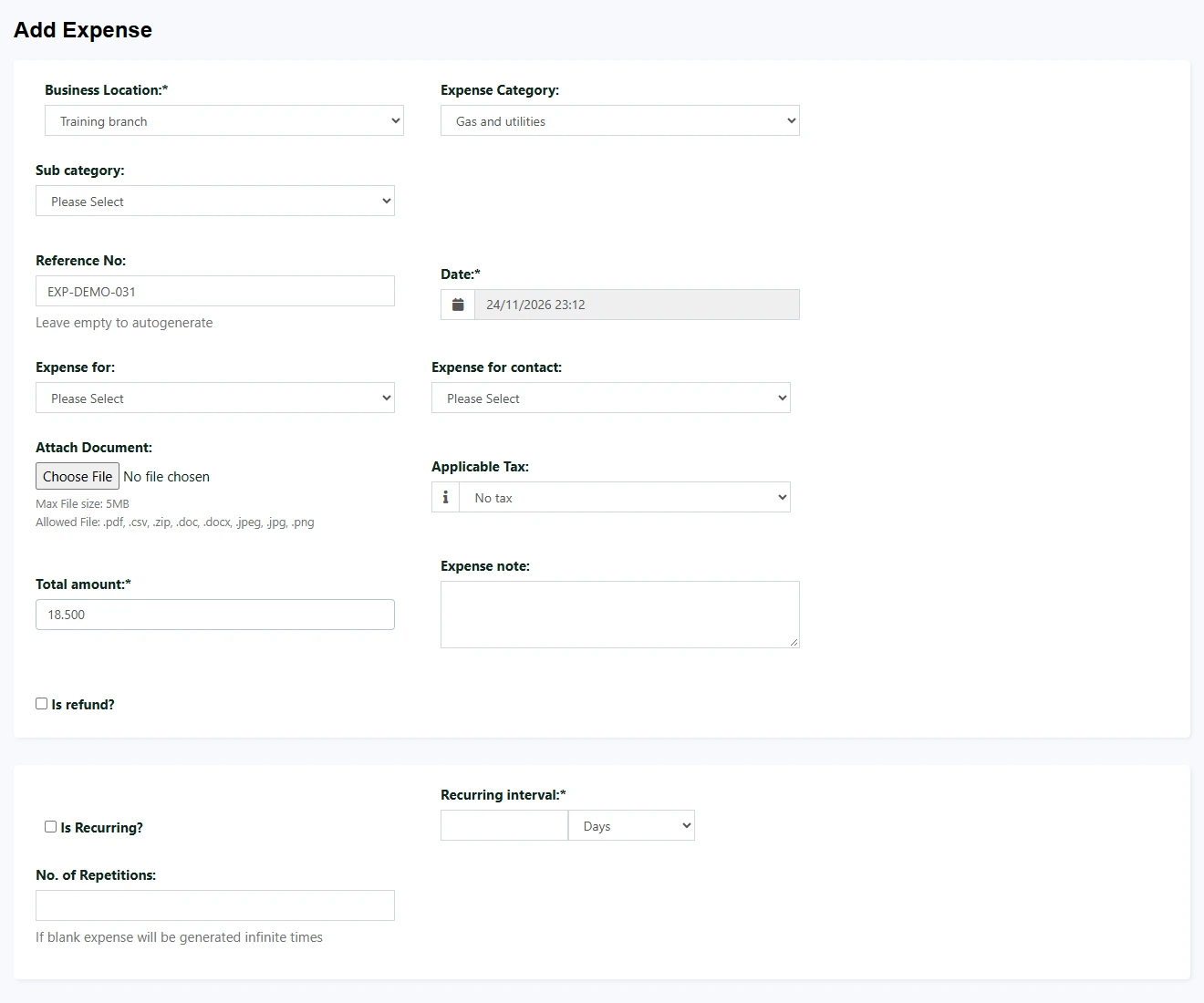
-
Open Add expense
In Expenses → Add, choose the branch, category and date.
-
Enter amount and receipt
Enter the total and any tax, and the receipt reference. Upload the receipt image if available.
-
Record what was paid
If paid, enter the amount and method. If not, leave it due and pay later from the same expense.
-
Check after saving
Open the expense and check branch, category and payment. If recurring, check the next date.
Fields and buttons
| Field or button | When to use it | Result and how to check |
|---|---|---|
| Branch and expense date | Verify where the expense belongs and its source date | Determines the branch and period shown in reports. |
| Expense classification | Choose the expense category and check the mapped account | Branch maintenance follows its chosen expense category in branch reporting. |
| Amount and evidence | Enter value and capture the source reference, notes and available attachments | A reviewer can match the journal to the expense evidence. |
| Payment section | If paid, enter the actual amount, tender and payment account | Reconcile a partial payment at its actual value and inspect the remaining balance. |
| Journal or till movement | Open the saved expense and verify its ledger and any actual payment | Check the document reference and account before daily reconciliation. |
Worked example
Partially paid maintenance
Training example. Branch maintenance costs KWD 25.000 and KWD 10.000 was paid in cash. Record the full expense and the actual KWD 10.000 payment, then verify KWD 15.000 due.
From ChatGPT or Claude
Once KEMET is connected to your assistant, copy and send this request:
Record an 18.500 gas expense paid in cash today for my branch.
The assistant reads data right away. Any change is shown to you in KEMET for approval before it runs, within your account permissions only.
Tools the assistant uses here
restaurant_propose_create_cash_paid_expenserestaurant_propose_create_unpaid_expenserestaurant_list_branch_expensesrestaurant_report_expenses_by_category
Verify the result
- Expense reference, branch and payment agree with the receipt.
- Category, outstanding amount and related entry appear where configured and permitted.
Common problems
The category exists but is unavailable for this branch
Check branch, category policy, subcategory and employee permissions.
The posted expense total differs from the cash movement
Compare the expense amount with the actual payment. Open payment records and check tender, account and outstanding amount.
For: Accountant Restaurant owner Branch manager
Screens and buttons depend on your account permissions and branches. Images show KEMET with training data.