
Map fingerprint IDs to employees and verify attendance processing
Trace one event from reader to raw log to employee attendance. Verify mapping, location and device time before reprocessing punches.
Steps
-
Check the device is sending
In Attendance device connections open the device and see last contact and last sync. Make a test punch.
-
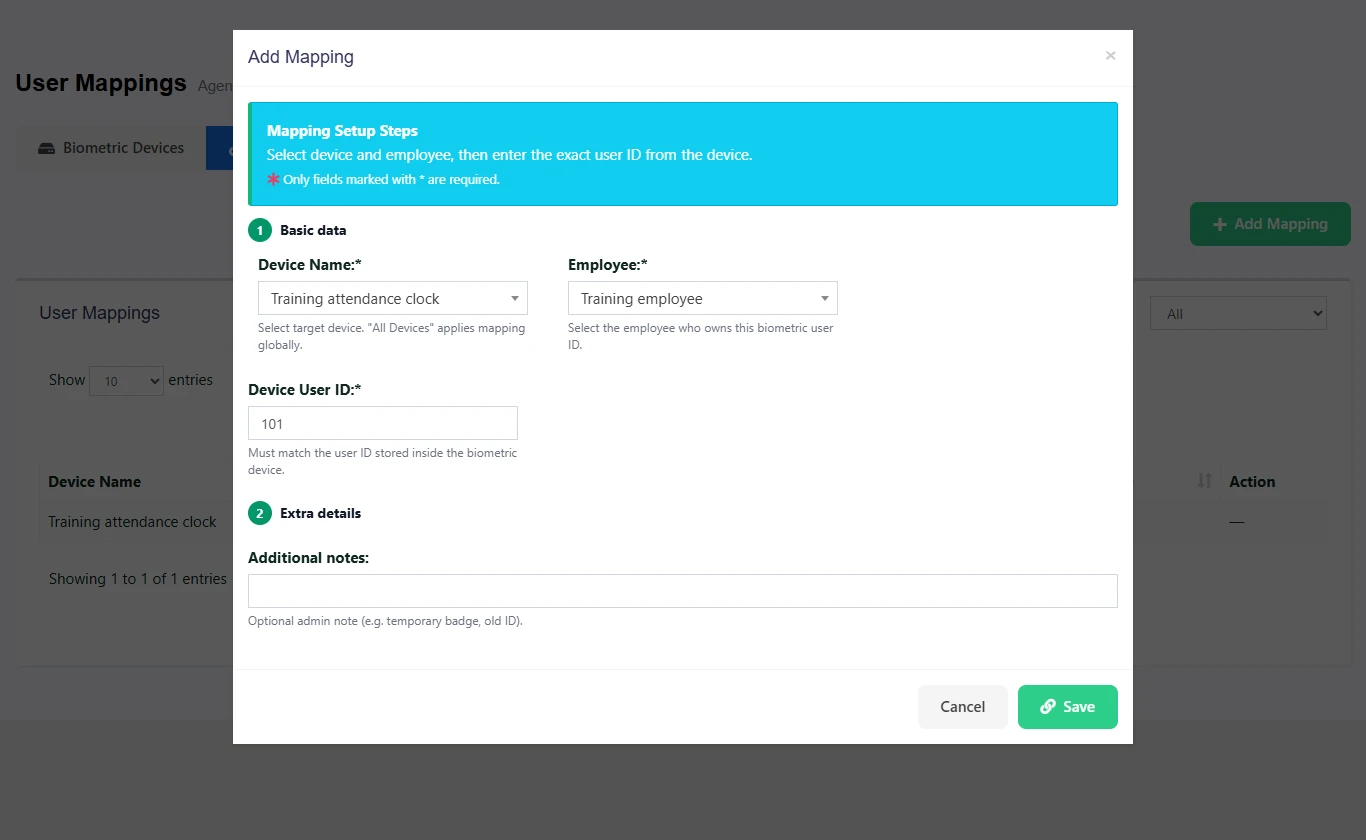
Map the device ID to the employee
In User mappings → Add mapping, choose the device and employee and enter their device ID exactly.
-
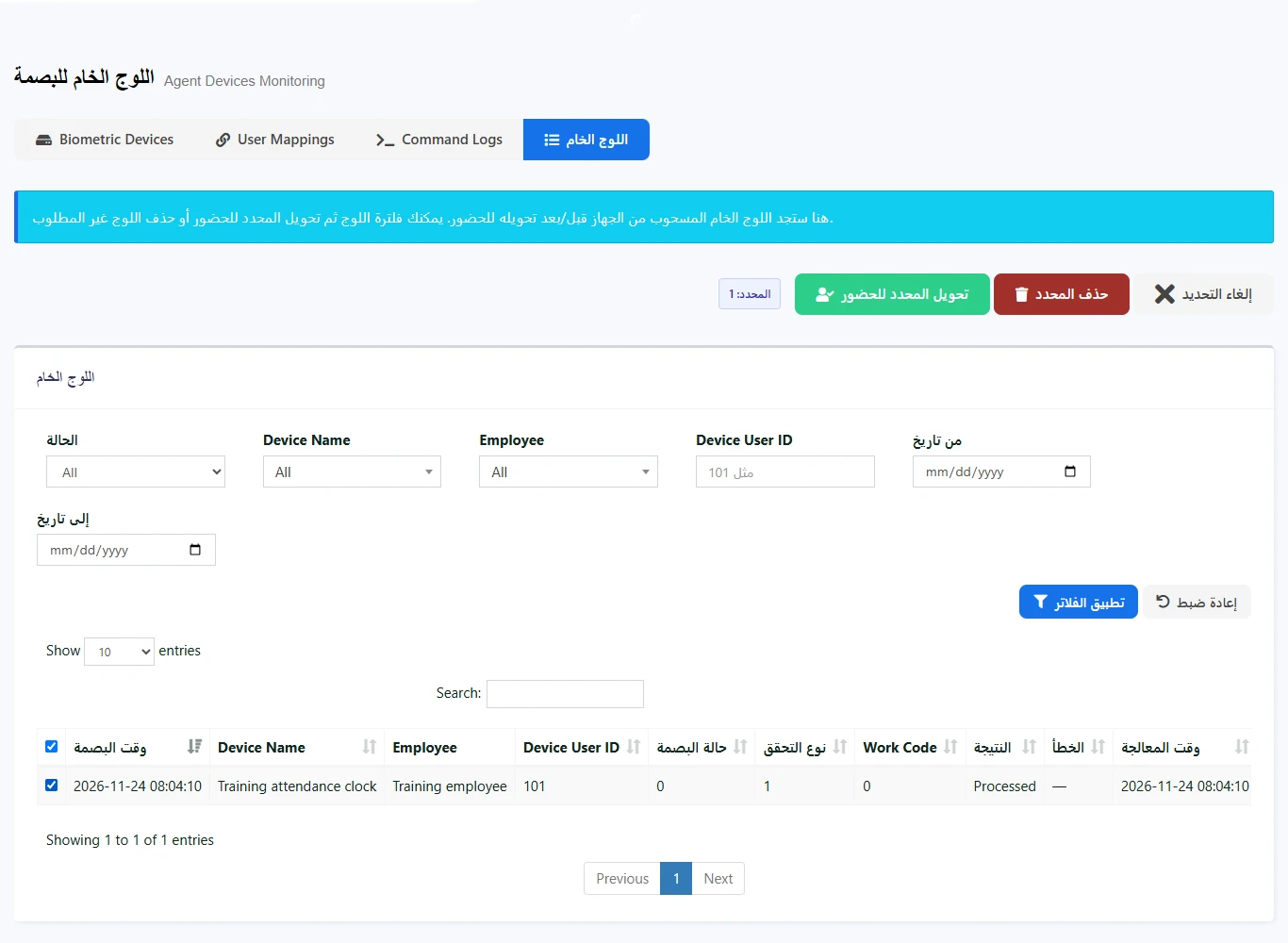
Review raw logs
Filter by device, ID and day. Unmapped means the punch arrived but needs a mapping.
-
Convert after fixing
After mapping, select the row and click the convert-to-attendance action.
-
Check attendance
Open Attendance for the same employee and day and match clock-in and out with the device.
-
Ask the assistant for a summary
Ask the assistant for the branch's fingerprint summary: processed and unmapped counts.
Fields and buttons
| Field or button | When to use it | Result and how to check |
|---|---|---|
| Device and branch | Choose the unit that generated the event. | Separates branch and device history when numeric IDs repeat across readers. |
| Device User ID | Copy the value exactly from the reader or its raw log. | The event can match the correct employee when the mapping is saved. |
| Employee and mapping state | Select the active employee in the company and appropriate branch. | Verify that the mapping is active before the next test. |
| Unmapped | Use when a received punch does not appear in employee Attendance. | Verify reader ID and employee before processing the corrected row. |
| Pending / Failed | Inspect processing state, error and date where displayed. | Check time, open attendance, branch and payroll period before reprocessing. |
| Processed | After the event has been received and processed through the configured flow. | Reconcile the clock-in or clock-out in employee Attendance. |
| Process selected raw logs | Select the qualifying source row after correcting the mapping or other issue. | Check the result and employee record before processing more logs. |
Screen images
Worked example
A received punch has no employee mapping
Training employee device ID 101 at Staff entrance appears at 08:02 as Unmapped. Verify 101 belongs to that reader, select the correct employee in User Mappings and process the row after saving. Confirm the 08:02 clock-in at the same branch. If the reader belongs to another branch, verify the mapping before processing.
From ChatGPT or Claude
Once KEMET is connected to your assistant, copy and send this request:
Show today's staff attendance from the fingerprint device and any lateness.
The assistant reads data right away. Any change is shown to you in KEMET for approval before it runs, within your account permissions only.
Tools the assistant uses here
restaurant_list_branch_attendance_clock_recordsrestaurant_report_attendance_device_processingrestaurant_report_employee_attendance_lateness
Verify the result
- Reader, employee and time agree across raw logs, user mappings and Attendance.
- Verify one processed event, then test a real clock-out to confirm it closes the correct attendance.
- When sharing a processing summary, use the period, branch, status and count. Review individual records in the authorized HR screen.
Common problems
Last sync is current but Attendance is empty
Open raw logs for the same branch, device and dates. Check Unmapped or Failed status and the device user ID. Correct the mapping or underlying error before processing selected records.
A punch appears at an old branch after a workplace transfer
Check the effective workplace transfer and mapping for the destination device. Punches from the prior branch remain for review after transfer. Verify open attendance and timestamps before asking HR to reprocess anything.
A legitimate event is rejected after payroll is closed
Check the month and error in the processing log. Follow the authorized payroll reconciliation procedure and keep the original punch reference with the correction request.
Same-minute punches or a duplicate result
Compare the reader, code, time and clock state before deciding. Check the original in the log and Attendance. A retried transmission on its own does not require a manual attendance entry.
For: Restaurant owner Branch manager
Screens and buttons depend on your account permissions and branches. Images show KEMET with training data.