
Check remaining stock, carry a batch forward or record waste
Track prepared lots and decide at the branch and lot level what carries to tomorrow or is written off as waste.
Steps
-
Open Remaining stock
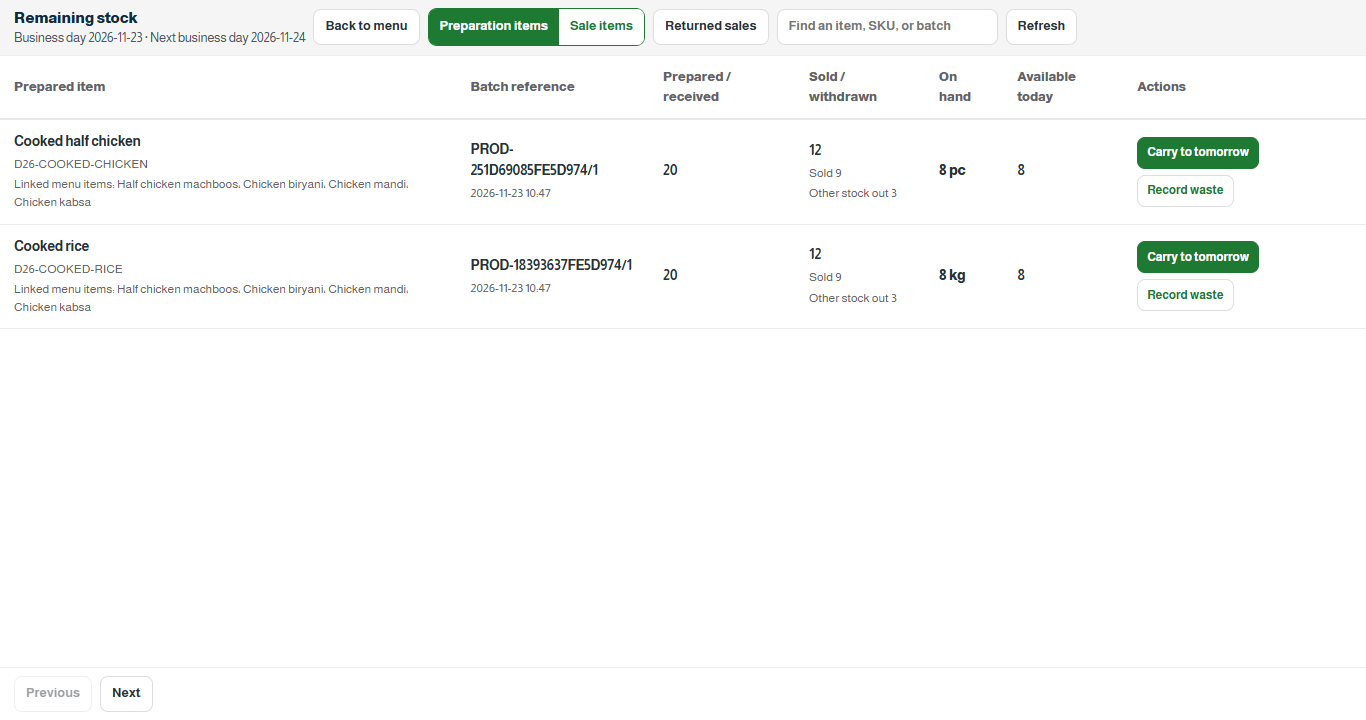
In POS open Remaining stock → Preparation items. Search by name or batch number.
-
Understand the figures
On hand = physical quantity. Available today = what can be sold after holds and carry-forward.
-
Carry forward or record waste
On the batch click Carry to tomorrow and enter the quantity, or Record waste with quantity and reason.
-
Stop an item that ran out
In Sale items click Stop selling on the item, and Resume selling when it is back.
-
Check the result
After carry-forward compare available and on hand. After waste see the waste movement.
-
Choose the right batch
With several batches, pick the one you checked, open the next day and confirm the quantity appears once.
-
Check unit and reason
Enter the quantity in the batch unit. If on hand exceeds available, check carried and held amounts before calling it waste.
Fields and buttons
| Field or button | When to use it | Result and how to check |
|---|---|---|
| Batch reference | If there are several production or receipt lots, check the reference before taking action. | Quantity and cost remain tied to the original item and lot. |
| Prepared / received | Shows the quantity recorded on the branch lot. | Match to the production or receipt document. |
| Sold / issued | Inspect issues when the amount exceeds known sales. Transfers or other stock issues can account for some of it. | Trace each source movement and total outflow on the same lot. |
| On hand / Available today | On hand is the physical quantity. Available today accounts for holds in the business-day calculation. | With 10 on hand and 8 carried forward, physical stock stays 10 and today's availability is 2 without other movements. |
| Carry to tomorrow | Choose an eligible quantity after the kitchen confirms it can be stored. | It holds the quantity for the next day on the same lot. Verify next business day and release. |
| Record waste | Enter actual quantity and reason for an eligible lot. | Posts a stock issue and waste record, with a journal when cost is supported and accounting enabled. |
| Stop or resume sale | In Sale items choose the branch and menu item. Use it to update availability. | Verify POS and storefront availability according to configuration. The action changes sale availability. |
Worked example
Carry forward 8 of 10
Training example. A lot has 10 available portions. Carrying 8 to tomorrow leaves 2 available today and 10 physically on hand until another movement. Review availability on the same lot next business day.
From ChatGPT or Claude
Once KEMET is connected to your assistant, copy and send this request:
Show prepared stock left at day end, carry the good part forward and record the rest as waste.
The assistant reads data right away. Any change is shown to you in KEMET for approval before it runs, within your account permissions only.
Tools the assistant uses here
restaurant_list_prepared_stockrestaurant_propose_carry_prepared_stockrestaurant_propose_waste_prepared_stock
Verify the result
- Carry-forward records the same lot reference and the next business day.
- Waste was recorded once and the issued quantity appears in the lot movement.
Common problems
Carry or Waste is disabled
Check today's availability, business day and permissions. Depleted lots can remain visible for review.
The item shows a dash for stock
In Sale items, check the stock source. Search for the item's tracked recipe output under Preparation items.
For: Cashier Kitchen team Branch manager Accountant
Screens and buttons depend on your account permissions and branches. Images show KEMET with training data.