
Identify sale items, ingredients and prepared output
Identify where stock is recorded before producing an item, carrying it forward or taking it off sale.
Steps
-
Know the item's source
A dish either has direct stock or is made at sale from a recipe that issues ingredients.
-
Preparation items
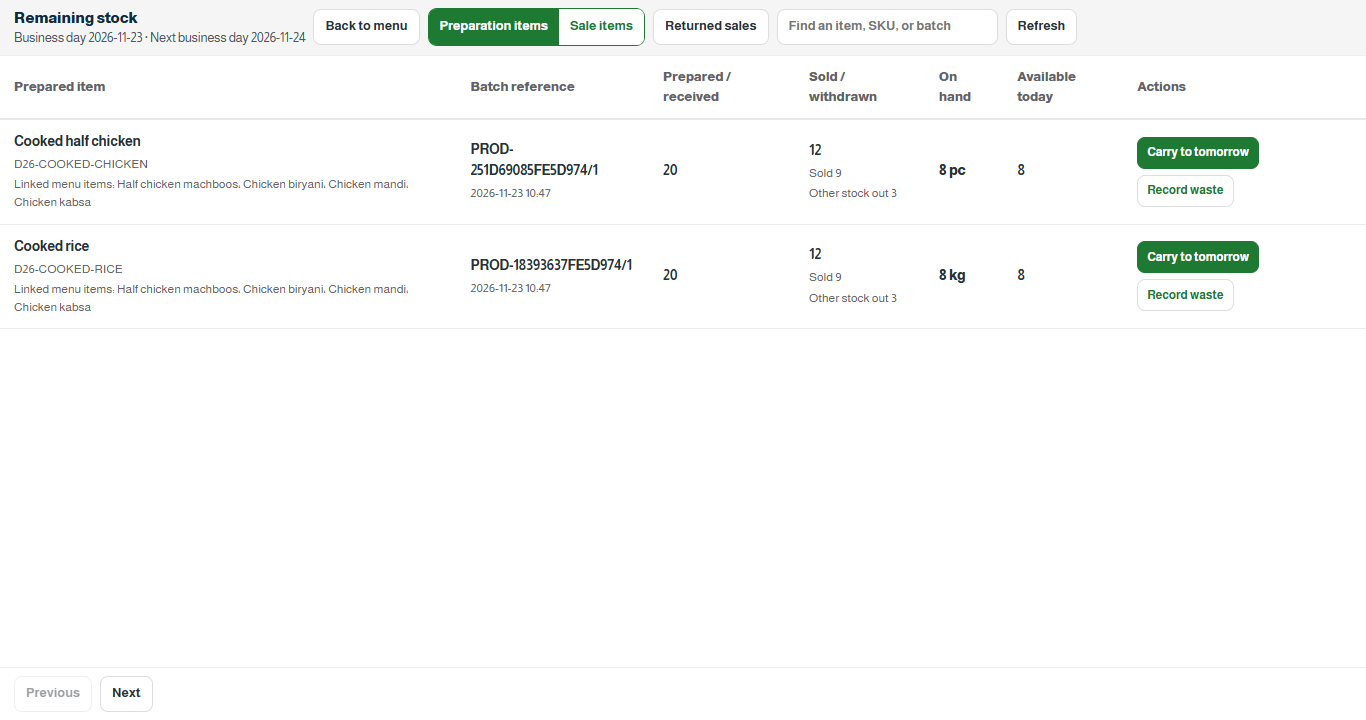
In Remaining stock → Preparation items you see batches of prepared food.
-
Sale items
In Sale items you see whether a dish is available. A recipe dish can be available even when its stock shows “—”.
-
In a production order
In New production order search for the prepared item in the same branch.
Fields and buttons
| Field or button | When to use it | Result and how to check |
|---|---|---|
| Branch and business day | Confirm the selected POS branch | Balances and availability belong to the branch’s business day. |
| Prepared/received and sold/issued | Check the lot that supplies the meals | Distinguishes output from sales and other issues. |
| On-hand vs saleable today | Compare them after a hold or carryover | Physically present stock may be unavailable in the current day. |
| Linked dishes | Review dishes affected by prepared-item availability | One lot can supply multiple dishes depending on recipe and setup. |
| Stop selling | Use Sales items for the correct branch, then verify its channels | The stop changes order availability. A documented inventory movement adjusts quantity. |
Worked example
A sale item built from prepared output
Training example. Chicken kabsa is a menu item, cooked half chicken is stored output, and raw chicken is an ingredient in its production recipe. Follow output by batch and kabsa availability under Sale items.
From ChatGPT or Claude
Once KEMET is connected to your assistant, copy and send this request:
Show items not sold directly and current stock in my branch.
The assistant reads data right away. Any change is shown to you in KEMET for approval before it runs, within your account permissions only.
Tools the assistant uses here
restaurant_list_catalog_non_sale_ingredientsrestaurant_list_stockrestaurant_list_prepared_stock
Verify the result
- The screen shows the selected branch and the stock source is known for each tested item.
- Preparation and sale use the correct source in the branch test.
Common problems
The Preparation items tab is empty
Check branch and business day, and search for the output. Confirm production completed and registered stock in that branch.
An item from another branch was expected
Check the production and requesting branches. For central kitchen stock, follow transfer and receipt at the destination.
For: Restaurant owner Branch manager Kitchen team
Screens and buttons depend on your account permissions and branches. Images show KEMET with training data.